...

Recipes

22 October 2025

AI Photoshoot Recipe: Studio Lookbook, Full-Body Fit on White

Jeremy P

Jeremy P

AI Photoshoot Recipe: Studio Lookbook, Full-Body Fit on White

Prompt Recipe
Image Size Portrait
Gender Female
Age 23
Ethnicity Asian
Hair Style Medium length hidden under cap
Hair Color Jet Black
Pose Candid moment
Facing Front
Expression Dreamy/Distant Gaze
Clothing Type (Top Half) T-Shirt
Fit Oversized
Color Washed black
Clothing Type (Bottom Half) Cargo Pants
Fit Oversized
Color Black
Other Clothing Black Adidas Sambas, black cap
Location White background
Style Studio Lookbook
Device DSLR
Lens 50mm Standard
Framing Full Body
Distortions

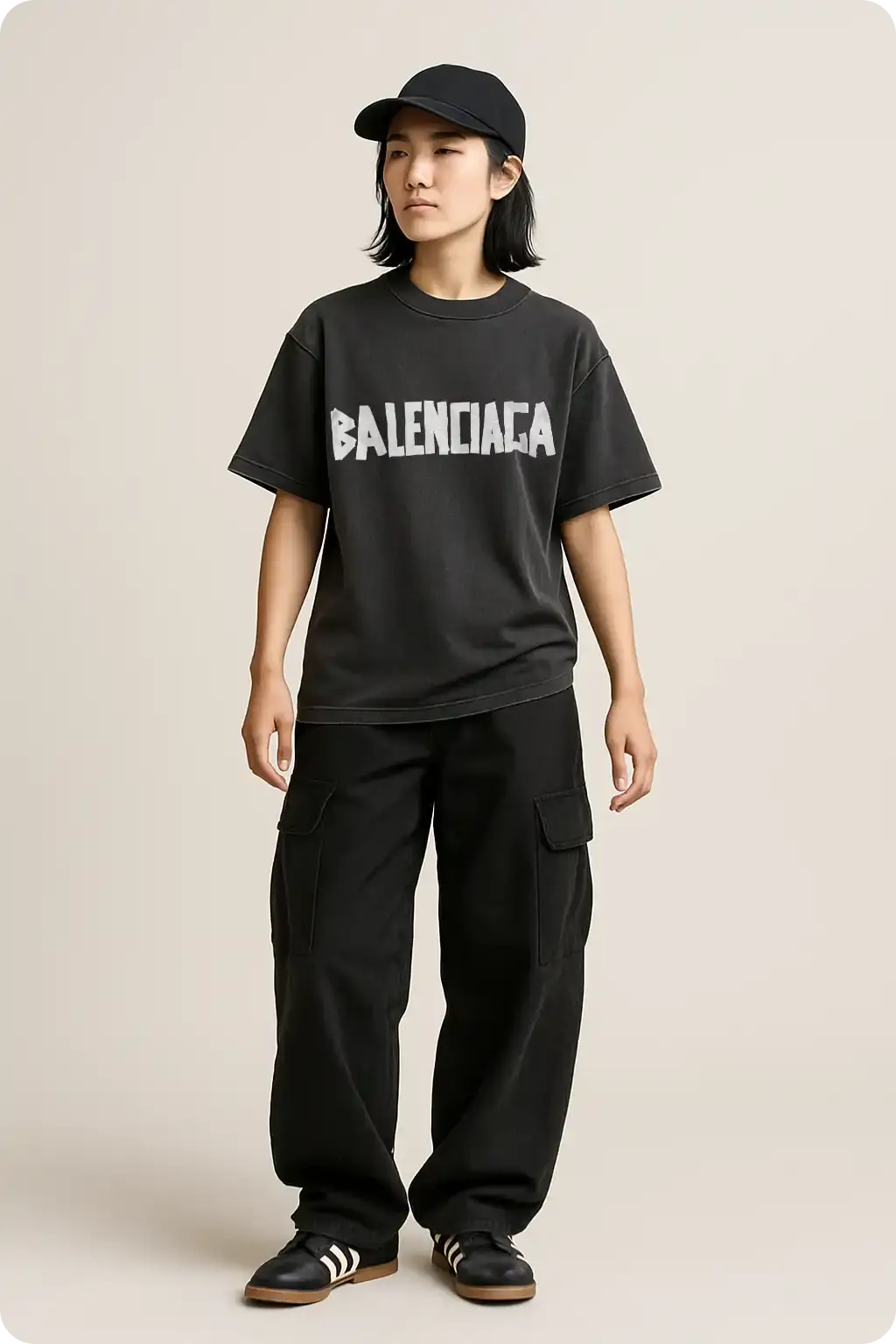
A full-body studio shot is a staple for any brand that cares about fit and fabric. It is simple, honest, and versatile. The entire outfit is visible from cap to shoes, so customers can read proportions, hem length, pocket placement, and silhouette in one glance. Using an AI photoshoot lets you keep this exact framing on repeat while you swap colorways, tweak graphics, or test different leg widths. You get countless options without booking a studio or crew.

ai photoshoot and mockup generator mockit ai

This look pairs a washed black boxy tee with relaxed cargo pants and low-profile sneakers. The neutral white background keeps attention on drape and seam lines, which is ideal for heavyweight fabrics and structured collars. Lighting is soft and even, so folds show up cleanly and the tee reads premium rather than flat. The stance is natural, not mannequin stiff, which makes the image feel like a real lookbook page instead of a catalog cutout.

Why this works for clothing brands

  • Full-body framing sells silhouette and styling ideas, not just a chest graphic.
  • White studio background is easy to standardize across drops, so your grid stays consistent.
  • AI photoshoots give you the same scene with instant variations for gender, size, and color runs.

Build notes

Keep the tee slightly oversized so shoulder drop and collar thickness are obvious. Let the cargos stack lightly at the ankles to show weight and texture. Aim for soft, diffused light from both sides with a gentle front fill to avoid harsh shadows under the chin and pockets. If you add a front logo, set a realistic scale that still reads on mobile. Use wrap and blend so the print follows micro-folds, then clip to the garment to prevent spill onto arms or background. Keep contrast moderate. You want rich blacks without crushing pocket detail. Leave a small margin above the cap and below the shoes, so the frame breathes and works as a square crop for the site or socials.

Remix ideas

  • Run a colorway set with the same scene, then schedule one per day.
  • Swap cargos for straight denim or track pants while keeping the tee and framing.
  • Add a light prop like a tote or folded hoodie for a styled variant.
  • Create a three-image series: front, quarter turn, and back, all with identical lighting.
  • Try cream or bone background for warmer product pages.

Make it with Mock It AI

PromptRecipe
Image SizePortrait
GenderFemale
Age23
EthnicityAsian
Hair StyleMedium length hidden under cap
Hair ColorJet Black
PoseCandid moment
FacingFront
ExpressionDreamy/Distant Gaze
Clothing Type (Top Half)T-Shirt
FitOversized
ColorWashed black
Clothing Type (Bottom Half)Cargo Pants
FitOversized
ColorBlack
Other ClothingBlack Adidas Sambas, black cap
LocationWhite background
StyleStudio Lookbook
DeviceDSLR
Lens50mm Standard
FramingFull Body
Distortions

A full-body studio shot is a staple for any brand that cares about fit and fabric. It is simple, honest, and versatile. The entire outfit is visible from cap to shoes, so customers can read proportions, hem length, pocket placement, and silhouette in one glance. Using an AI photoshoot lets you keep this exact framing on repeat while you swap colorways, tweak graphics, or test different leg widths. You get countless options without booking a studio or crew.

ai photoshoot and mockup generator mockit ai

This look pairs a washed black boxy tee with relaxed cargo pants and low-profile sneakers. The neutral white background keeps attention on drape and seam lines, which is ideal for heavyweight fabrics and structured collars. Lighting is soft and even, so folds show up cleanly and the tee reads premium rather than flat. The stance is natural, not mannequin stiff, which makes the image feel like a real lookbook page instead of a catalog cutout.

Why this works for clothing brands

  • Full-body framing sells silhouette and styling ideas, not just a chest graphic.
  • White studio background is easy to standardize across drops, so your grid stays consistent.
  • AI photoshoots give you the same scene with instant variations for gender, size, and color runs.

Build notes

Keep the tee slightly oversized so shoulder drop and collar thickness are obvious. Let the cargos stack lightly at the ankles to show weight and texture. Aim for soft, diffused light from both sides with a gentle front fill to avoid harsh shadows under the chin and pockets. If you add a front logo, set a realistic scale that still reads on mobile. Use wrap and blend so the print follows micro-folds, then clip to the garment to prevent spill onto arms or background. Keep contrast moderate. You want rich blacks without crushing pocket detail. Leave a small margin above the cap and below the shoes, so the frame breathes and works as a square crop for the site or socials.

Remix ideas

  • Run a colorway set with the same scene, then schedule one per day.
  • Swap cargos for straight denim or track pants while keeping the tee and framing.
  • Add a light prop like a tote or folded hoodie for a styled variant.
  • Create a three-image series: front, quarter turn, and back, all with identical lighting.
  • Try cream or bone background for warmer product pages.

Make it with Mock It AI

Jeremy P
Jeremy P

Jeremy P is the Founder and Owner of Mock It AI, Mock It, and Pixel Sauce. With years of experience, Jeremy has assisted thousands of brands, designers, and individuals in creating high-quality product images and mockups for their businesses and clients. A pioneer and leader in the apparel mockup space, Jeremy is dedicated to finding innovative ways to help brands and designers enhance their visual content. His expertise and forward-thinking approach make him a prominent figure in the industry.  

Recipes

22 October 2025

AI Photoshoot Recipe: Studio Lookbook, Full-Body Fit on White

Jeremy P

Jeremy P

AI Photoshoot Recipe: Studio Lookbook, Full-Body Fit on White

Prompt Recipe
Image Size Portrait
Gender Female
Age 23
Ethnicity Asian
Hair Style Medium length hidden under cap
Hair Color Jet Black
Pose Candid moment
Facing Front
Expression Dreamy/Distant Gaze
Clothing Type (Top Half) T-Shirt
Fit Oversized
Color Washed black
Clothing Type (Bottom Half) Cargo Pants
Fit Oversized
Color Black
Other Clothing Black Adidas Sambas, black cap
Location White background
Style Studio Lookbook
Device DSLR
Lens 50mm Standard
Framing Full Body
Distortions

A full-body studio shot is a staple for any brand that cares about fit and fabric. It is simple, honest, and versatile. The entire outfit is visible from cap to shoes, so customers can read proportions, hem length, pocket placement, and silhouette in one glance. Using an AI photoshoot lets you keep this exact framing on repeat while you swap colorways, tweak graphics, or test different leg widths. You get countless options without booking a studio or crew.

ai photoshoot and mockup generator mockit ai

This look pairs a washed black boxy tee with relaxed cargo pants and low-profile sneakers. The neutral white background keeps attention on drape and seam lines, which is ideal for heavyweight fabrics and structured collars. Lighting is soft and even, so folds show up cleanly and the tee reads premium rather than flat. The stance is natural, not mannequin stiff, which makes the image feel like a real lookbook page instead of a catalog cutout.

Why this works for clothing brands

  • Full-body framing sells silhouette and styling ideas, not just a chest graphic.
  • White studio background is easy to standardize across drops, so your grid stays consistent.
  • AI photoshoots give you the same scene with instant variations for gender, size, and color runs.

Build notes

Keep the tee slightly oversized so shoulder drop and collar thickness are obvious. Let the cargos stack lightly at the ankles to show weight and texture. Aim for soft, diffused light from both sides with a gentle front fill to avoid harsh shadows under the chin and pockets. If you add a front logo, set a realistic scale that still reads on mobile. Use wrap and blend so the print follows micro-folds, then clip to the garment to prevent spill onto arms or background. Keep contrast moderate. You want rich blacks without crushing pocket detail. Leave a small margin above the cap and below the shoes, so the frame breathes and works as a square crop for the site or socials.

Remix ideas

  • Run a colorway set with the same scene, then schedule one per day.
  • Swap cargos for straight denim or track pants while keeping the tee and framing.
  • Add a light prop like a tote or folded hoodie for a styled variant.
  • Create a three-image series: front, quarter turn, and back, all with identical lighting.
  • Try cream or bone background for warmer product pages.

Make it with Mock It AI

PromptRecipe
Image SizePortrait
GenderFemale
Age23
EthnicityAsian
Hair StyleMedium length hidden under cap
Hair ColorJet Black
PoseCandid moment
FacingFront
ExpressionDreamy/Distant Gaze
Clothing Type (Top Half)T-Shirt
FitOversized
ColorWashed black
Clothing Type (Bottom Half)Cargo Pants
FitOversized
ColorBlack
Other ClothingBlack Adidas Sambas, black cap
LocationWhite background
StyleStudio Lookbook
DeviceDSLR
Lens50mm Standard
FramingFull Body
Distortions

A full-body studio shot is a staple for any brand that cares about fit and fabric. It is simple, honest, and versatile. The entire outfit is visible from cap to shoes, so customers can read proportions, hem length, pocket placement, and silhouette in one glance. Using an AI photoshoot lets you keep this exact framing on repeat while you swap colorways, tweak graphics, or test different leg widths. You get countless options without booking a studio or crew.

ai photoshoot and mockup generator mockit ai

This look pairs a washed black boxy tee with relaxed cargo pants and low-profile sneakers. The neutral white background keeps attention on drape and seam lines, which is ideal for heavyweight fabrics and structured collars. Lighting is soft and even, so folds show up cleanly and the tee reads premium rather than flat. The stance is natural, not mannequin stiff, which makes the image feel like a real lookbook page instead of a catalog cutout.

Why this works for clothing brands

  • Full-body framing sells silhouette and styling ideas, not just a chest graphic.
  • White studio background is easy to standardize across drops, so your grid stays consistent.
  • AI photoshoots give you the same scene with instant variations for gender, size, and color runs.

Build notes

Keep the tee slightly oversized so shoulder drop and collar thickness are obvious. Let the cargos stack lightly at the ankles to show weight and texture. Aim for soft, diffused light from both sides with a gentle front fill to avoid harsh shadows under the chin and pockets. If you add a front logo, set a realistic scale that still reads on mobile. Use wrap and blend so the print follows micro-folds, then clip to the garment to prevent spill onto arms or background. Keep contrast moderate. You want rich blacks without crushing pocket detail. Leave a small margin above the cap and below the shoes, so the frame breathes and works as a square crop for the site or socials.

Remix ideas

  • Run a colorway set with the same scene, then schedule one per day.
  • Swap cargos for straight denim or track pants while keeping the tee and framing.
  • Add a light prop like a tote or folded hoodie for a styled variant.
  • Create a three-image series: front, quarter turn, and back, all with identical lighting.
  • Try cream or bone background for warmer product pages.

Make it with Mock It AI

Jeremy P
Jeremy P

Jeremy P is the Founder and Owner of Mock It AI, Mock It, and Pixel Sauce. With years of experience, Jeremy has assisted thousands of brands, designers, and individuals in creating high-quality product images and mockups for their businesses and clients. A pioneer and leader in the apparel mockup space, Jeremy is dedicated to finding innovative ways to help brands and designers enhance their visual content. His expertise and forward-thinking approach make him a prominent figure in the industry.