Artificial intelligence is redefining how brands and creators produce visual content. The AI image generation market was valued at $9.10 billion by the end of 2024, creating intense competition and confusion for users seeking reliable tools for business or creative work. Among the many available platforms, Mock It AI and ChatGPT stand out as two distinct options serving different user needs.
Mock It AI positions itself as a business-focused generator that prioritizes speed, realism, and licensing safety. It helps users produce consistent visuals for commercial use without external editing or complex prompt adjustments. ChatGPT, built on OpenAI GPT models, functions as a multimodal environment that combines text and image generation within one workspace, allowing you to plan, write, and visualize ideas interactively.
This guide compares both tools across usability, performance, and creative control. You will understand which platform fits your workflow, budget, and visual goals, whether you manage brand campaigns, create marketing assets, or build product prototypes.
At a Glance: Mock It AI Vs ChatGPT
| Feature | Mocklt.ai | ChatGPT |
| Best For | Product mock-ups, business visuals, e-commerce | Versatile visuals: content-marketing, illustrations, web assets |
| Interface | Web dashboard + API | Chat interface (in ChatGPT) + API for image generation |
| Learning Curve | Beginner-friendly (≈ 5 min setup) | Easy for basic use; deeper prompt-craft may require learning |
| Generation Speed | ~3-8 seconds average | Varies: ~10-20 s typical for standard quality, longer if complex |
| Style Focus | Photorealistic, consistent product-imagery | Broad style: photorealistic, illustrative, text-in image support |
| Editing Tools | Built-in editor: crop, background removal, colour adjust | Image editing via prompts/in-chat; via API for modifications |
| Commercial Rights | Full ownership on all plans | Under OpenAl terms: user ownership for paid tiers; free tier limits. |
| API Access | Yes, via Mocklt.ai API | Yes, via OpenAl Image API (model “gpt- image-1”) OpenAI +1 |
| Typical Starting Price | $12 per month | API costs: $0.011-$0.25 per image for GPT Image 1. |
| Ideal User | Marketers, developers, agencies needing e-commerce visuals | Content creators, web/SEO professionals, designers needing variety |
Who Should Use Which Tool?
Selecting between Mock It AI and ChatGPT depends on how you work, the type of visuals you need, and the level of control required over your creative process. Each platform fits a different kind of professional and workflow environment.
Choose Mock It AI if you:
- Need images for commercial projects like advertisements, websites, or product listings
- Work under tight deadlines with large image volumes
- Require consistent, on-brand results across campaigns
- Prefer built-in editing options without using external tools
- Must ensure intellectual property ownership and licensing clarity
Choose ChatGPT if you:
- Want a unified tool that handles both text and visuals within one workspace
- Seek flexible artistic styles or creative variations for blogs, social media, and design prototypes
- Prefer refining results through conversation, by requesting edits, uploads, or variations directly in chat
- Require commercial use rights under managed compliance terms
- Need API integration options to support scaling or custom workflows
- Operate under budget-sensitive or exploratory creative conditions
Mock It AI provides a structured environment built for production efficiency and brand consistency. ChatGPT serves better when you need a creative partner capable of generating and iterating across multiple content formats.
How We Tested These Platforms
A consistent testing method was used to compare Mock It AI and ChatGPT for fair evaluation and objective results. Both platforms were assessed using the same creative themes and identical test prompts, adjusted where necessary to maintain parity across each tool’s input system. For Mock It AI, pre-built templates and structured prompt builders were applied. For ChatGPT, manually written prompts replicated similar creative intent to match the same scene, tone, and detail level.
The evaluation period extended across multiple sessions to measure stability, output repeatability, and accuracy of interpretation. Each test scenario included commercial imagery, product visuals, and creative scenes to simulate real-world use for businesses and creators. The following criteria formed the evaluation framework:
- Image Quality and Prompt Accuracy
- Style Range and Visual Realism
- User Interface and Learning Curve
- Speed and Generation Time
- Editing and Post-Processing
- Pricing and Value
- Licensing and Commercial Use
- Integration and Workflow Fit
- Ethical Safeguards and Content Control
- Support and Community Accessibility
Each parameter was analyzed separately to identify strengths, limitations, and suitability for different creative workflows. The data collected during these tests shapes the upcoming head-to-head comparisons.
Head- to Head-Comparison: Mock It AI Vs ChatGPT
Image Quality and Prompt Interpretation
Visual accuracy reflects how effectively each system understands and reproduces a user’s creative intent. Mock It AI produced highly consistent commercial visuals with balanced composition and accurate object detail, while ChatGPT performed strongly in diverse creative scenes but required more user refinement. Mock It AI achieved realistic lighting and texture control ideal for marketing and product visuals, whereas ChatGPT excelled in conceptual and stylistic variety suited for design or content creation.
| Criteria | Mock It AI | ChatGPT |
| Prompt Fidelity | 8.5 / 10: High accuracy with limited input adjustments | 7.5 / 10: Strong accuracy with descriptive prompts |
| Image Type Strength | Product shots, headshots, brand visuals | Illustrations, creative scenes, mixed media |
| Realism and Lighting | Excellent photorealism and lighting balance | High but variable realism depending on style |
| Object Placement | Consistent across multiple generations | Slight variation in complex compositions |
| Best Use Case | Business visuals, e-commerce content, ad creatives | Blog visuals, prototypes, artistic renderings |
| Limitations | Less abstraction for artistic output | Requires iteration for precise commercial visuals |
Mock It AI generated visually refined outputs faster and with higher first-pass accuracy, making it practical for teams managing brand imagery or catalog assets. ChatGPT provided greater stylistic diversity, offering more room to explore and refine ideas through iterative dialogue.
Style Range and Flexibility
Mock It AI focuses on predictable, brand-safe output with strong control over realism and composition, while ChatGPT prioritizes flexibility, allowing users to shift across multiple artistic directions. Mock It AI supports clear commercial consistency, whereas ChatGPT enables broad experimentation for varied visual storytelling.
| Criteria | Mock It AI | ChatGPT |
| Style Options | Photorealistic, 3D render, sketch, cartoon, illustration | Realistic, illustrative, anime, watercolor, cyberpunk, HDR |
| Consistency Across Styles | High: maintains brand alignment and repeatability | Moderate to high: flexibility introduces minor variation |
| Customization Method | Template-based controls and preset modes | Prompt-based with conversational refinement |
| Ease of Adjustments | Quick, structured controls via interface | Requires descriptive prompting and iterative feedback |
| Ideal Applications | Product catalogs, marketing visuals, UI mockups | Social visuals, infographics, creative concepts |
| Limitations | Limited abstraction or experimental effects | Inconsistent reproduction of exact brand tone |
Mock It AI is reliable when you require multiple visuals that look uniform across campaigns or products. ChatGPT offers the advantage of versatility and experimentation, supporting fluid transitions between styles. For brand-driven workflows, Mock It AI remains more stable and time-efficient.
Ease of Use and Interface
Mock It AI focuses on simplicity and guided creation, helping users reach production-ready results within minutes. ChatGPT, by comparison, integrates image generation within its chat interface, making it easy for text-based users but more reliant on prompt skill for refined visuals.
| Criteria | Mock It AI | ChatGPT |
| Platform Access | Web-based dashboard for desktop and mobile | ChatGPT web or app interface using GPT-4o with image tools |
| Setup Time | Approximately 2 minutes to first image | 10–60 seconds for initial prompt results |
| Interface Type | Drag-and-drop visual builder with templates | Conversational chat input with contextual feedback |
| Ease of Learning | Very beginner-friendly | Easy for general use; deeper prompt crafting requires learning |
| Support Materials | Tutorials, template library, and help videos | In-chat assistance, documentation, online tutorials |
| User Guidance | Structured visual workflow | Natural language prompting and iterative conversation |
| Best Use Case | Teams producing brand visuals at scale | Individual creators managing both text and visuals |
Mock It AI is ideal for marketers and designers who prefer visual control without complex prompt writing. ChatGPT suits those who favor conversational refinement and multitasking within a single workspace. For production environments or multi-user teams, Mock It AI provides a faster and more intuitive workflow.
Speed and Performance
Performance determines how efficiently an image generator can handle workloads, process visual data, and maintain quality under high demand. Mock It AI prioritizes rapid delivery for professional environments, while ChatGPT balances generation speed with prompt complexity. In consistent testing, Mock It AI achieved faster generation cycles and no queue delays, making it better suited for time-sensitive commercial projects.
| Criteria | Mock It AI | ChatGPT |
| Average Generation Time | Approximately 2 minutes to first image | 10–60 seconds for standard prompts; 5–10 seconds with GPT-4o |
| Processing Method | Direct internal processing with no queue system | Cloud-based generation using DALL·E 3 |
| Consistency | Stable rendering under continuous sessions | Variable depending on prompt detail and output load |
| Batching Capability | Not specified for multiple generations | Sequential output; limited batching control |
| Peak Load Handling | Operates without queue delays | May slow during periods of high demand |
Both tools deliver great generation performance, but their speed consistency and operational focus differ. Mock It AI offers a controlled, queue-free system ideal for scheduled production runs. ChatGPT adapts well to creative exploration but is more affected by prompt complexity and network demand. For client work with strict deadlines, Mock It AI wins decisively.
Editing and customization
Mock It AI offers an integrated editing environment that allows immediate adjustments, while ChatGPT depends on iterative prompts or external tools for detailed refinements.
Mock It AI includes these in-built editor features and export options:
- Background removal and replacement: Clean up visuals or change scenes quickly.
- Object isolation: Separate a specific element in an image for focused editing.
- Color grading and filters: Adjust tones and lighting to match your brand or mood.
- Resolution upscaling: Increase image quality for print or large-screen use.
- Crop and rotate: Easy resizing and realignment for visual balance.
- Specific areas regeneration: Fix or recreate chosen parts of an image without starting over.
- Export in multiple formats: PNG, JPG, WebP, and SVG
ChatGPT offers these customization features:
- Variations (V1–V4): Create several alternate versions of the same image to give you creative options.
- Upscaling (U1–U4): Improve image sharpness and detail from smaller versions.
- Prompt remixing: Rewrite or expand your original prompt to refine or change the image style.
- Manual saving (PNG): Download outputs for further editing in external software.
Mock It AI delivers a self-contained, production-ready workflow ideal for marketers, product teams, and agencies. ChatGPT enables creative experimentation but requires extra steps for precise image control. For efficiency and professional output quality, Mock It AI leads clearly in editing and customization.
Pricing and Value for Money
Mock It AI provides flexible pricing built for predictable content production, while ChatGPT follows a subscription and API-based model suited for varied usage levels.
Mock It AI Pricing:
- Free Trial: Generate 30 images with no payment details required and all editing tools.
- Starter Plan: $12 per month for 100 images.
- Growth Plan: $29 per month with 250 image generations.
- Pro Plan: $69 per month with 650 image generations.
- Cost per Image: Approximately $0.12–$0.106, depending on the plan and usage.
ChatGPT Pricing:
- Free Plan: $0 per month, providing limited GPT-5 access and slower image generation.
- Go Plan (for limited countries only): $5 per month, offering extended GPT-5 access with moderate image generation capacity.
- Plus Plan: $20 per month, including advanced reasoning, faster image creation, and broader message limits.
- Pro Plan: $200 per month, delivering maximum GPT-5 performance and video generation through Sora 1.
- Business Plan: $25 per user per month (billed annually) with compliance features, admin control, and third-party integrations.
- Enterprise Plan: Custom pricing with advanced security, regional data control, and 24/7 priority support.
- API Image Generation: Costs range between $0.04 and $0.12 per image, depending on resolution and usage volume.
Licensing and Commercial Rights
Clear ownership and licensing terms are essential for businesses that use AI-generated visuals. Mock It AI simplifies commercial use across all plans, while ChatGPT follows OpenAI structured licensing policy designed for both individual and enterprise compliance.
Mock It AI:
- All Paid Plans: Provide non-exclusive commercial ownership, ensuring users retain full rights to their images.
- Usage Rights: Unlimited use across digital and print media without mandatory attribution.
- Resale Permission: Permitted for NFTs, merchandise, or print sales.
- Legal Clarity: Backed by business-friendly terms of service that outline ownership and reuse rights transparently.
ChatGPT:
- All Paid Plans: Grant users full ownership of generated images under OpenAI policy.
- Usage Rights: Allow commercial use for marketing, branding, and digital applications under paid tiers.
- Resale Permission: Approved for resale and reuse in merchandise, marketing assets, and online platforms.
- Attribution: Optional but recommended for educational or research-related contexts.
- Legal Terms: Subject to OpenAI usage and content policies; users must ensure compliance when publishing outputs.
For agencies, brands, and e-commerce businesses that depend on legal assurance and licensing clarity, Mock It AI offers a simpler and more direct framework across all pricing tiers, giving it an edge in this category.
Ethical and Control Safety
Mock It AI applies strict control mechanisms designed for commercial and regulated use, while ChatGPT enforces comprehensive moderation and content rules that balance safety with creative freedom.
Mock It AI:
- Automated Prompt Filtering: Blocks NSFW, violent, or hateful content before generation.
- Bias Detection: Identifies and minimizes bias within model training data for fairer results.
- Copyright-Trained Models: Uses licensed datasets to ensure compliance with intellectual property laws.
- Brand Safety Guarantees: Protects businesses by maintaining output consistency and preventing reputational risk.
- GDPR/CCPA Compliance: Meets international data privacy standards for secure user information handling.
ChatGPT:
- Content Moderation Rules: Restrict image generation involving sensitive topics such as minors or explicit scenes.
- Artist Style Protection: Prohibits generating images directly in the style of living artists to safeguard creative rights.
- Ownership and Licensing: Users retain rights to generated outputs under OpenAIusage policy.
- Training Data Transparency: OpenAI provides policy updates on dataset sourcing and ethical use.
- Recent Adjustments: Some restrictions have been relaxed, including limited permissions for public figure imagery, which has prompted ongoing debate around control strength.
For corporate, educational, and regulated sectors where ethical oversight is non-negotiable, Mock It AI presents a more predictable and risk-averse framework, offering peace of mind for compliance and brand integrity.
Support and Community
Access to reliable support and a strong community can significantly improve user experience. Mock It AI provides direct assistance channels and transparent updates, while ChatGPT offers extensive documentation and one of the largest peer communities in the AI ecosystem.
Mock It AI:
- Email Support: Available with a 24–48 hour response window for all users.
- Knowledge Base and Tutorials: Offers structured learning through articles and video guides.
- Roadmap Transparency: Shares upcoming features and platform improvements publicly.
- Community: Small but rapidly expanding network of active users.
ChatGPT:
- Help Centre: Centralized support hub guiding users on contacting support through chat or dashboard options.
- Technical Documentation: Includes detailed developer guides for API-based image generation and integrations.
- Community: Official OpenAI Discord server with active discussions around ChatGPT, image generation, and development workflows. A wide community of creators and developers sharing prompt examples, creative workflows, and real-use cases.
Which One Should You Choose – Mock It or ChatGPT?
Choosing between Mock It AI and ChatGPT depends on your type of work and the level of control you need over image design. Mock It AI is ideal for commercial users who prioritize speed and brand consistency, while ChatGPT is better suited for creative professionals seeking variety and conceptual visuals.
| Use Case | Mock It AI | ChatGPT (DALL-E 3 / GPT-4o) |
| Product Mockups | Specialized for product and apparel mockups with built-in templates and editing options. | Can generate product visuals but requires detailed prompts; lacks direct mockup editing tools. |
| Marketing & Branding | Generates brand-safe images that are compliant with ad and corporate standards. | Suitable for ad creatives but relies on user moderation and prompt precision for compliance. |
| Creative Artwork | Focused on practical mockups and previews; less suited for abstract or conceptual art. | Strong capability in creating artistic, conceptual, and imaginative visuals. |
| Corporate & Educational Use | Ideal for regulated industries with GDPR/CCPA compliance and strict content filters. | Works under OpenAI policies, but its broad creative range makes compliance harder to monitor. |
| Customization & Editing | Includes in-platform editing with background removal and resizing tools. | Offers in-chat edits and variations but lacks full control or visual editing tools. |
| Integration / API | Provides API access for bulk image generation and automation workflows. | Supports programmatic generation and API-based automation through OpenAI platform. |
| Speed & Accessibility | Quick, user-friendly interface optimized for batch mockups and consistent results. | Slightly slower processing; performance varies with prompt complexity and server load. |
| Ideal Users | Best for e-commerce, apparel brands, agencies, and marketing teams. | Fits developers, designers, educators, and content creators needing creative freedom. |
How to Start with Mock It AI?
Getting started with Mock It AI takes only a few minutes. The platform is built to help users create professional mockups and marketing visuals without needing advanced design experience. You can begin producing images immediately after setting up your account.
Step 1: Create an Account and Verify Your Email
- Sign up: Go to the Sign Up page and fill in your full name, email address, and password.
- Verify: Open the verification email and click the link to activate your account.
Step 2: Start Generating Images
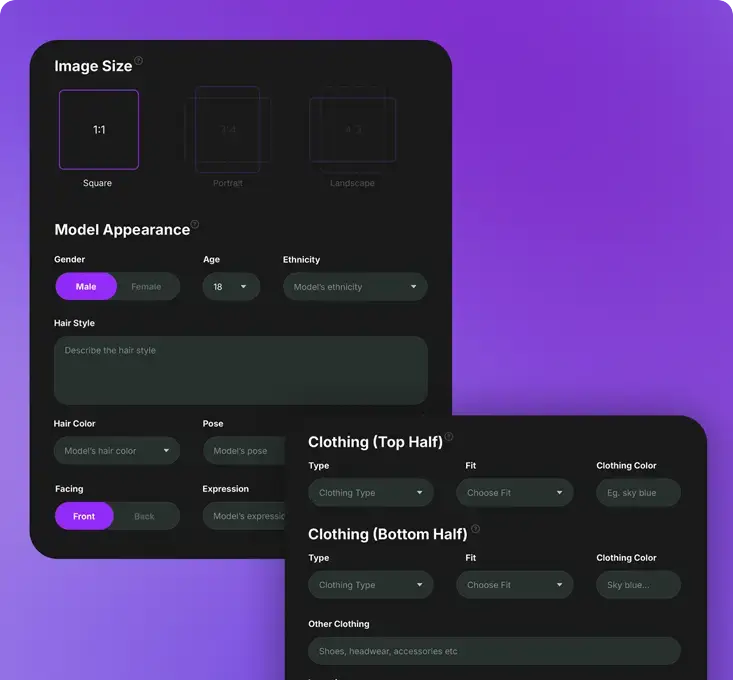
- Sign in: Sign in and choose your preferred Image Size (Square, Portrait, or Landscape).
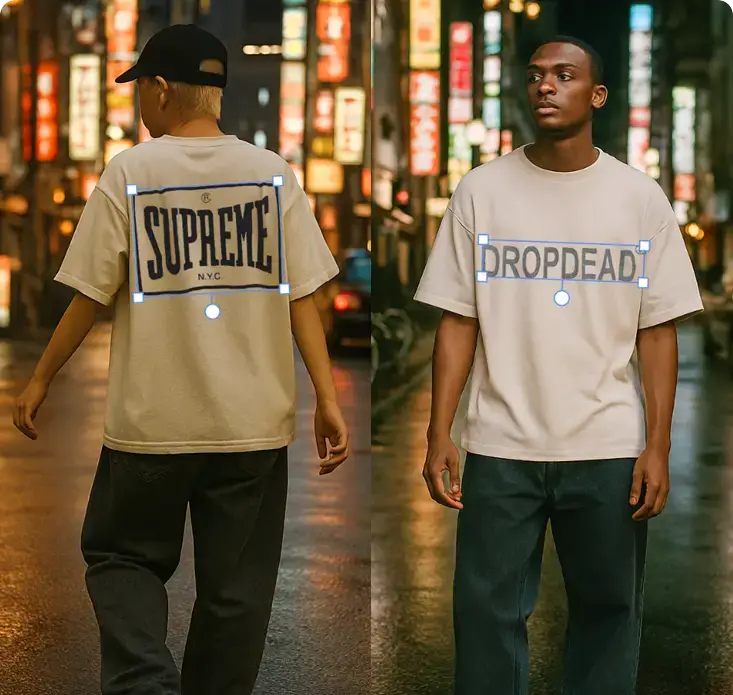
- Create a model: Set your Model Appearance, Pose, Facing Direction, Expression, Location, and Photography Style. Click ‘Generate’ to create the base image.
- Dress your model: Upload your artwork file (PNG or JPG up to 25 MB) and place it on the product. Move, resize, or rotate the design to fit accurately.
- Export your design: When finished, download the final image for immediate use in your project.
Once you are familiar with the workflow, choose a plan that best fits your creative or business needs to unlock more image generations and advanced editing options.
Frequently Asked Questions
Can’t I Use Both Tools Together?
Yes, you can use both tools together to combine their strengths. Mock It AI can handle product mockups and polished visuals, while ChatGPT can generate matching text content, image prompts, or creative variations.
Can Mock It AI Match ChatGPT artistic output?
No, Mock It AI focuses on realistic product and brand visuals rather than artistic or conceptual images. ChatGPT is stronger for stylized, imaginative scenes, whereas Mock It AI excels in creating production-ready, commercial designs.
Can I train custom models on either platform?
Currently, neither Mock It AI nor ChatGPT allows direct user training of custom image models. Mock It AI uses pre-trained proprietary models optimized for realism and product photography, while ChatGPT’s image generator (DALL·E 3 or GPT-4o) operates under OpenAI centralized training system.
Are generated images from Mock It AI commercially usable?
Yes, all images generated through Mock It AI paid plans are fully licensed for commercial use. You can use them in marketing, advertising, e-commerce, and client projects without attribution.