| Prompt | Recipe |
|---|---|
| Image Size | Portrait |
| Gender | Male |
| Age | 25 |
| Ethnicity | Asian |
| Hair Style | Medium length fringe |
| Hair Color | Jet Black |
| Pose | Waist Up Pose |
| Facing | Front |
| Expression | Neutral |
| Clothing Type (Top Half) | Hoodie |
| Fit | Oversized |
| Color | Orange |
| Clothing Type (Bottom Half) | Sweatpants |
| Fit | Oversized |
| Color | Black |
| Other Clothing | Black sunglasses, hood covering head |
| Location | White background |
| Style | Lifestyle |
| Device | Disposable Camera |
| Lens | – |
| Framing | Waist Up |
| Distortions | Graining |
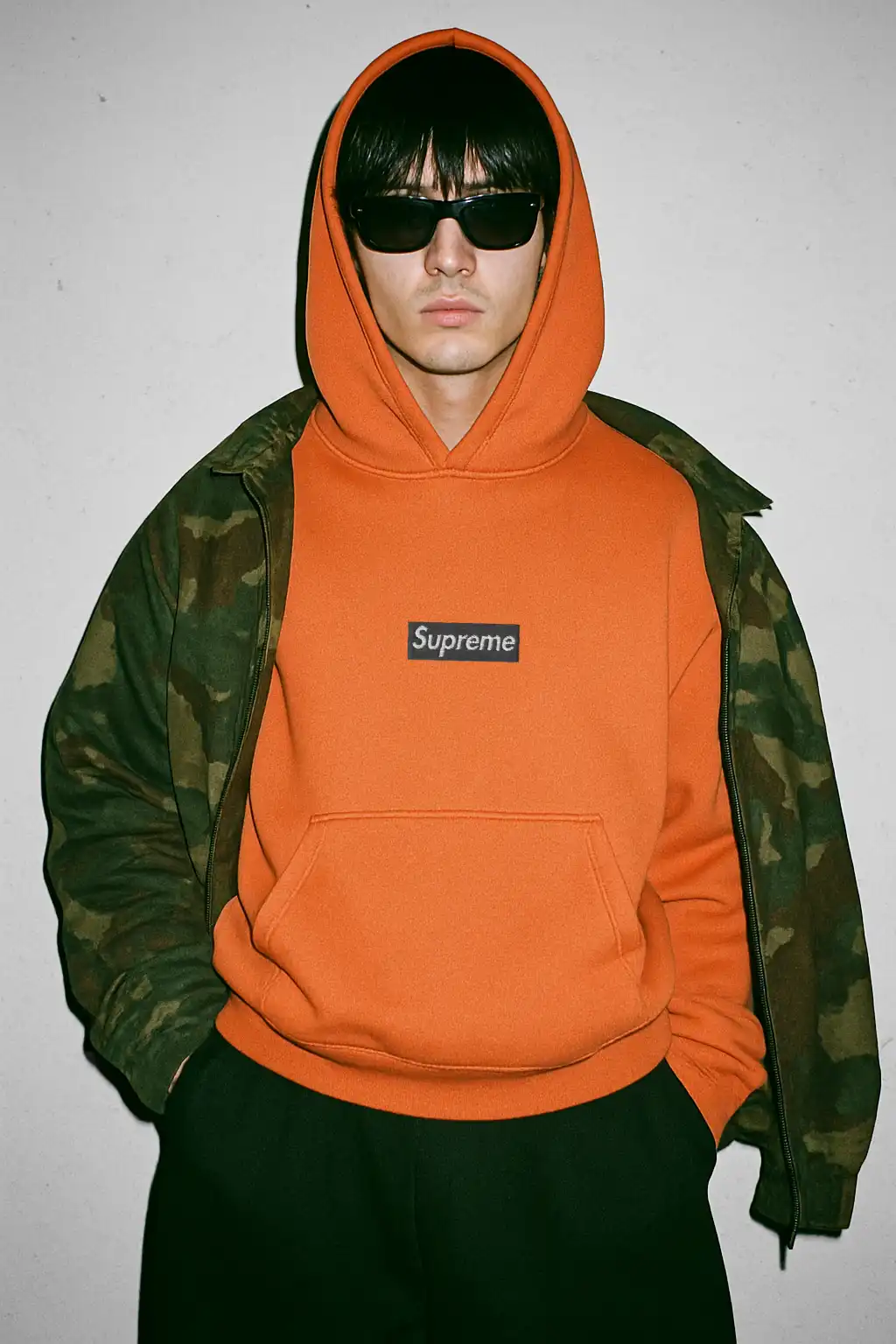
A clean flash portrait like this is perfect for announcing a drop without overthinking the set. The look is direct, a little gritty, and built to spotlight your graphic or logo with zero distraction. Using an AI photoshoot means you can lock this framing, then run fast variations, from color swaps to subtle fit changes, in minutes. Your brand gets endless creativity with consistent output across product pages and social.

This setup leans on a straight-on crop from the waist up, with a heavyweight hoodie as the hero layer. The camo jacket sits off the shoulders for texture and depth, and dark sunglasses keep the face neutral so the garment reads first. The background stays plain to make the flash do the heavy lifting. Think lo-fi editorial with a street mood.
The vibe comes from that disposable-camera feel. Hard frontal light flattens shadows, adds a crisp edge around the hood, and brings out fabric grain. A touch of visible noise and minor imperfections keeps it looking like a candid backstage shot rather than studio stock. If you are building this in Mock It AI, aim for a bright on-axis flash, a neutral white wall, and moderate grain in the midtones and shadows.
Why this works for clothing brands
- It sells silhouette, logo placement, and material texture in one simple frame.
- The neutral face and direct camera angle keep attention on the chest graphic.
- It is repeatable. You can re-run the same scene for every colorway to keep your grid consistent while you experiment with styling.
Build notes
Keep the hoodie boxy and structured so seams are clean. If you add artwork, set a realistic scale that reads on mobile without looking oversized. Use wrap and blend so the print rides the folds, and clip to the garment to prevent spill onto the pocket or jacket. If highlights get too hot, pull them down slightly so orange tones stay rich. A little film grain is good, but keep it even so it feels like scanned 35mm rather than digital noise.
Remix ideas
- Swap to charcoal, ivy, or cream hoodies while keeping the same lighting and crop.
- Ditch sunglasses for a softer read, or try tinted lenses for a fashion spin.
- Zip the camo jacket halfway for a layered look while preserving the logo focus.
- Tighten crop for product pages, widen slightly for hero banners.
- Try a cooler color grade for winter, warmer for drop teasers.
Make it with Mock It AI
Ready to build your own version, with editable settings and repeatable results: