AI style guides are reshaping how fashion brands manage their visual identity. Unlike outdated PDF guidelines, these tools use AI to create consistent, on-brand visuals in minutes, not weeks. Here’s why they’re a game-changer:
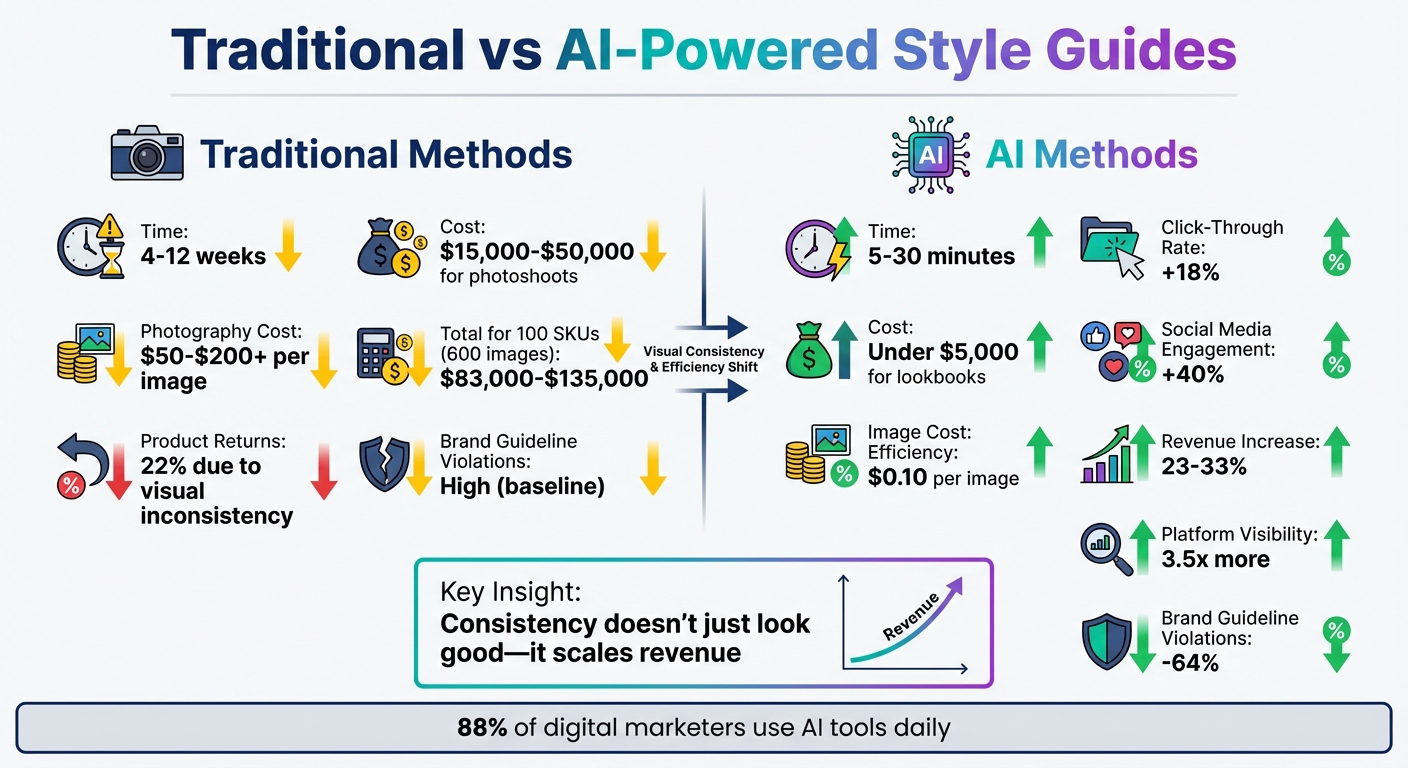
Faster Turnaround: Generate assets in 5–30 minutes instead of 4–12 weeks.
Cost Savings: AI lookbooks cost under $5,000, compared to $15,000–$50,000 for traditional photoshoots.
Better Results: Brands report an 18% increase in click-through rates and 40% higher social media engagement.
Scalability: AI automates lighting, color grading, and composition, ensuring consistency across thousands of images.
For brands, this means fewer errors, reduced costs, and a cohesive look across platforms like Instagram, Shopify, and TikTok. Tools like Mock It AI even allow brands to create photorealistic mockups in seconds, cutting reliance on photographers or studios.
AI-driven style guides are not just a tool – they’re a necessity for brands aiming to scale efficiently while maintaining quality.
Traditional vs AI-Powered Fashion Style Guides: Cost and Performance Comparison
Why Fashion Brands Need AI Style Guides
Challenges of Maintaining Consistent Branding
Fashion brands often struggle to keep their product catalogs visually consistent. Over time, subtle differences in lighting, color tones, and overall mood – known as "visual drift" – can creep in, undermining the brand’s identity and consumer trust. A striking example of this is that 22% of product returns happen because items "look different in person".
Traditional style guides, while useful, can also create inefficiencies. If a skilled designer isn’t available, less experienced team members might produce assets that fail to align with the brand’s identity. This leads to what some refer to as "brand debt" – a gradual erosion of brand cohesion. Adding to the complexity, maintaining consistency often requires the same photographer, studio, and lighting setup for every shoot. But as product lines grow – from, say, 50 SKUs to 500 or more – this approach becomes impractical.
The costs? Significant. A brand with 100 SKUs needing 600 images could spend anywhere from $83,000 to $135,000 on traditional photography. And with platforms like Amazon, Shopify, Instagram, and TikTok demanding constant updates, the logistical burden only grows. Inconsistent branding not only inflates costs but also creates operational headaches.
How AI Solves These Challenges
AI steps in as a game-changer, tackling these inconsistencies by automating and standardizing the entire visual identity process.
Instead of relying on subjective interpretations of a brand’s "look", AI translates that abstract feeling into precise digital rules. These rules dictate lighting, shadows, color grading, and composition. Using just 1–5 reference images, AI extracts the brand’s "visual DNA" and applies it uniformly to all new assets. It’s a shift from static PDF guidelines to a dynamic, scalable system.
"Your brand aesthetic should be a file, not a feeling." – Nightjar
The numbers speak for themselves. AI-driven style guides reduce the time spent on manual asset organization by 70%, slash image costs to approximately $0.10 per image (compared to $50–$200+), and drive revenue increases of 23% to 33%. On top of that, brands with consistent visuals across platforms see up to 3.5 times more visibility.
These transformative benefits highlight why AI-driven style guides are becoming an essential tool for modern fashion brands. They not only cut costs but also ensure a cohesive visual identity across every channel.
sbb-itb-2c1a147
Key Components of AI-Generated Style Guides
Core Visual Elements
AI-generated style guides break down your brand’s identity into precise, machine-readable instructions, eliminating the guesswork often involved in traditional guidelines.
Start with color hierarchies. AI needs exact percentages for color usage: primary colors should dominate 60–70% of your designs, secondary colors take up 20–30%, and accent colors should remain at 5–10%. This ensures every AI-generated visual maintains your brand’s color balance effortlessly.
Fabric and texture standards are equally important. Specify details like matte versus glossy finishes or smooth versus textured surfaces. Define how materials like silk, wool, denim, or sequins should appear. These precise instructions enable AI to replicate your brand’s material aesthetic consistently across all visuals.
Model specifications round out the core elements. Document preferences for body types, ethnicities, age ranges, and poses – standing, sitting, walking, or editorial. High-quality catalogs often use a small selection of 1–3 defined model identities across product categories to maintain a cohesive look. Include lighting preferences, such as "cinematic lighting", "soft shadows", or "high detail", to control atmosphere and ensure consistent mood across all AI-generated assets.
Moodboards and Typography Guidelines
Moodboards and typography take these foundational elements a step further, refining your brand’s digital presence. AI-powered moodboards streamline creativity by automatically sourcing visuals from fashion libraries or social media based on themes like "coastal minimalism" or "bold streetwear". These tools categorize images by fabric, silhouette, or texture, saving time by eliminating the need for manual sorting. Teams using AI design tools have reported producing 30–50% fewer physical samples and saving over 10 weeks of development time each year.
Typography guidelines should do more than list approved fonts. Establish clear hierarchies for headlines, body text, and captions. Define the typographic mood – whether bold and attention-grabbing or subtle and understated. This ensures AI-generated materials maintain a consistent voice across platforms. By linking moodboards directly to Product Lifecycle Management (PLM) tools and tech packs, you can carry this vision seamlessly from concept to production.
Tailoring Style Guides to Apparel Categories
Style guides should also address the unique needs of each apparel category. Different products require specific AI instructions. For example, denim might need heavy fabric drape with natural creases, while silk blouses should have a light, flowing appearance with minimal tension. AI must understand how garments behave – tight-fitting activewear moves differently than loose streetwear.
Lighting and environment settings should also vary by context. E-commerce catalogs often require clean, shadow-free studio lighting for clarity, while editorial campaigns might benefit from dramatic "golden hour" lighting to evoke emotion. Create a library of prompt templates tailored to each category to ensure consistent visuals at scale.
Lastly, standardize your input photography before it reaches the AI. Use consistent settings – white backgrounds, even lighting, and uniform framing – across all source images to avoid inconsistencies. This consistency forms the foundation for AI to replicate your brand’s aesthetic across thousands of SKUs, feeding directly into automated processes that deliver both efficiency and cost savings. These detailed instructions are the backbone of a scalable, AI-powered style guide.
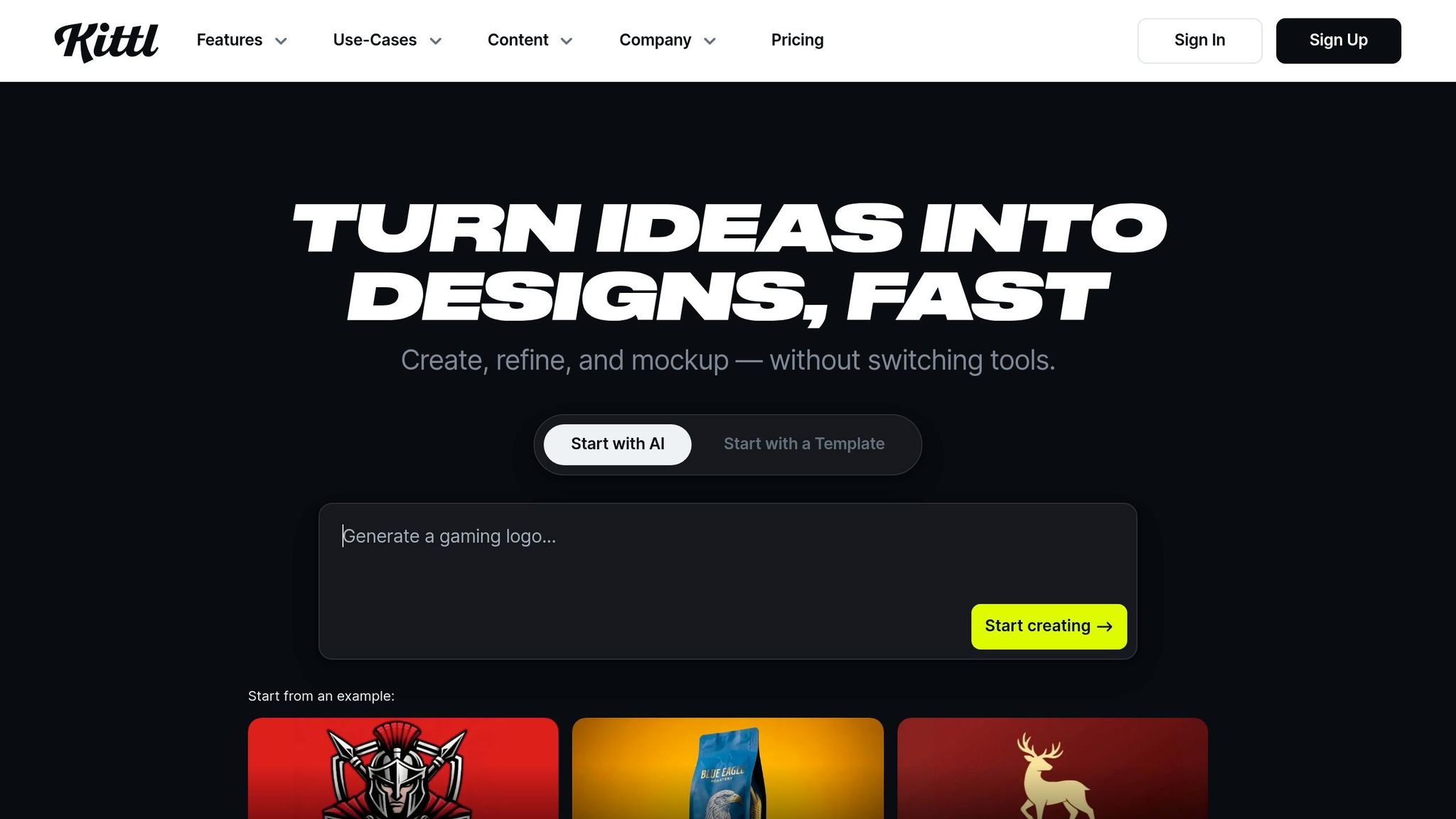
AI Designs a FULL Brand in Minutes (My Kittl Workflow)
How to Create AI Style Guides: Step-by-Step Process
Creating a consistent visual identity is essential for any brand, and an AI-driven style guide can help translate your branding into scalable, uniform assets. Here’s a step-by-step breakdown of how to build one effectively.
Step 1: Upload Brand and Inspiration Images
Start by uploading images that reflect your brand’s visual identity. These could include product photos, lifestyle shots, and campaign imagery that showcase your color palette, lighting, and overall aesthetic. To ensure consistency, select 3–5 "anchor" images with similar technical settings. These images will help the AI understand key elements of your style, such as lighting angles, shadow depth, and color grading. This step lays the groundwork for creating precise prompts in the next phase.
Step 2: Use Prompt Engineering
Develop clear and detailed master prompts to guide the AI. These prompts should include specifics like product descriptions, your brand’s visual style, lighting details, background elements, and even a quality tier (e.g., "Vogue magazine quality"). Avoid vague instructions by using weighted emphasis, such as {CRITICAL: studio lighting at 45°}, to highlight non-negotiable elements.
Leverage tools like ChatGPT to refine your prompts and align them with your brand’s tone. Define three to five adjectives (e.g., "warm", "bold", "insightful") that encapsulate your brand’s personality. Additionally, create a Visual Brand Bible that includes your primary RGB/hex codes, lighting preferences, and composition guidelines. This document will serve as a reference to maintain consistency throughout the process.
Step 3: Generate Custom Mockups
With your prompts ready, start generating images tailored to your products and settings. Use multi-reference prompting – combining multiple images with targeted text instructions – to ensure a consistent look. Specialized tools can help "freeze" product details like logos and text, keeping them aligned with your original uploads.
For e-commerce, the AI can analyze a single product image to generate a "Standard E-com Trio" (front, side, and top-down views) with consistent lighting. If you’re creating a lookbook, you can swap out backgrounds and models to create a variety of lifestyle images that still align with your brand. Interestingly, brands using AI-generated lookbooks have reported an 18% boost in click-through rates and a 40% increase in social media engagement.
Step 4: Validate and Finalize Assets
Evaluate each generated asset on criteria like color, lighting, composition, style, and quality, using a 1–10 scale. Aim for a total score between 40 and 50. If an asset scores below 35, regenerate it. Pay close attention to details – zoom in on fabric textures to ensure the AI has accurately captured elements like the grain of cotton or the sheen of silk.
Once satisfied, upscale the assets to 4K or 300 DPI to preserve fine details. Ensure images are at least 2,048 pixels wide, which is essential for features like zooming on e-commerce platforms such as Shopify. To maintain quality over time, conduct weekly audits on a random sample of 10 images and establish version control for your master prompts. This way, you can revert to earlier versions if needed.
Mock It AI takes the style guide process to the next level by turning your guidelines into automated, on-brand mockups. This platform eliminates the need for photographers, studios, or physical samples by allowing you to create custom photoshoots entirely digitally. Trusted by thousands of fashion brands, it can generate high-quality mockups in under 30 seconds.
Key Features of Mock It AI
Mock It AI’s standout tool is its Custom AI Model Creator, where you can define every detail of your digital model. From gender and age to hairstyle, expression, and pose, this feature ensures your visuals align perfectly with your brand’s representation goals. The platform also includes a wide range of apparel options, such as t-shirts, hoodies, sweatshirts, tank tops, v-necks, sweatpants, jeans, and more.
Its 3D mapping technology is a game-changer, automatically wrapping designs onto models while accounting for fabric folds and contours.
"The 3D mapping and clipping mask features mean I don’t have to manually edit layers anymore".
You can also customize environments and lighting. Whether you want to describe a specific location or adjust shadows to fit your brand’s aesthetic, the platform gives you full control.
The prompt builder simplifies the creative process with guided "design recipes" that cover model details, clothing, and lighting configurations.
"Generate professional mockups in under a minute without going back and forth on prompts. I used to pay designers, now it’s part of my workflow".
For those seeking even more creative flexibility, advanced camera settings allow you to fine-tune lens type, depth of field, and framing, mimicking the control of a professional photoshoot.
Pricing Plans and Value
Mock It AI uses a credit-based system, where one credit equals one image. Here’s a breakdown of the plans:
Plan
Monthly Price
Credits (Mockups)
Key Features
Starter
$12
100
Custom models, clothing control, save 10 mockups
Growth
$29
250
$0.10 per extra image, save 50 mockups
Pro
$69
650
Commercial license, save 50 mockups
The platform also offers a free trial with 30 images and full access to editing tools. High-resolution downloads are available in square (1,024×1,024px), portrait (1,024×1,536px), and landscape (1,536×1,024px) formats. The Pro plan includes a commercial license, so you can use your mockups for marketing and e-commerce without additional permissions.
These flexible pricing options make it easy for fashion brands to integrate AI into their creative workflows.
Applications for Fashion Brands
Mock It AI helps fashion brands streamline their creative processes, from lookbooks to social media content and design prototyping.
One of its most impactful uses is design prototyping. Instead of creating physical samples, brands can experiment with styles, fabrics, and trends digitally before committing to production.
"Mock It AI lets me bang out decent product pics in an hour and keep moving. It’s significantly improved workflow efficiency".
For social media campaigns, the platform has cut turnaround times in half while maintaining the consistent visual identity that brands rely on. This efficiency allows brands to focus more on strategy and less on logistics.
Best Practices for Scalable Branding with AI
Training AI on Diverse Silhouettes
To ensure consistent branding, it’s crucial to train AI models using a wide variety of silhouettes. This involves uploading a diverse set of images for each clothing category, showcasing different styles, materials, colors, and intricate details. Depending on the platform’s capabilities, AI training typically requires anywhere from 20 to over 1,000 images to achieve accurate, brand-aligned results.
Advanced AI models take this a step further by using multi-image fusion to maintain consistency in character and clothing across various settings and backgrounds. Some models boast up to 95% accuracy in character consistency for generated visuals.
This investment in AI training pays off – companies that maintain consistent brand presentation report an average revenue boost of 23%.
Refining Prompts for Fabric and Design Accuracy
Think of prompts as your digital style guide. Precision is key. For instance, instead of describing a color as "navy", specify its exact hex code to ensure uniformity, especially when lighting conditions vary.
Prompts should also include manufacturing details like print methods (e.g., "discharge", "plastisol"), stitch density for embroidery, and fabric specifications such as texture and weight (e.g., "chunky cable stitch", "heavy 12oz denim"). Lighting conditions, including direction and temperature (e.g., "natural window light from the left", "5,500K for cool lighting"), can also be incorporated for more accurate outputs.
Negative prompts are equally important. Use them to instruct the AI on what to avoid, such as "no drop shadows", "no gradients", or "no tiny micro-details that won’t translate well in production." Guardrails like "maximum 3 ink colors" or "no 3D effects" ensure the AI generates production-ready designs that align with your brand’s manufacturing capabilities.
Integrating AI Style Guides into Workflows
A practical way to streamline branding efforts is by creating reusable Brand Prompt Templates. These templates should include placeholders for specific products and fixed design specifications, such as "2px uniform stroke" or "matte finish with subtle grain." Assign a team member to keep these templates updated and enforce their usage across projects.
"The prompt is your style guide. When you use an AI SVG Generator with carefully structured prompts, you’re essentially programming the AI to follow your brand guidelines automatically." – SVG AI Team
Although 88% of digital marketers utilize AI tools daily, only 1% of businesses fully realize the return on investment from generative AI. This is often due to a lack of prompt-engineering expertise – 69% of designers lack the necessary skills to maximize AI’s potential. However, when implemented correctly, AI-powered brand management can lead to a 70% boost in asset organization efficiency and a 64% drop in brand guideline violations.
Conclusion
AI-powered style guides are reshaping how fashion brands maintain visual consistency. Traditional methods for creating style guides can take 4–8 weeks and cost between $18,000 and $53,000. By comparison, AI solutions not only save time and money but also deliver measurable results, like increasing revenue by up to 23% and reducing guideline violations by 64%.
The real game-changer lies in scalability and precision. By converting your brand’s visual identity into AI-driven prompt templates, you create a digital tool as essential as your brand font or hex code. This ensures that every image or campaign visual adheres to your lighting, color grading, and composition rules. The result? No more style drift, even in large-scale operations, and a consistent brand presence across all platforms.
Take Mock It AI as an example of how this works in practice. With affordable monthly plans, it enables fashion brands to produce hundreds of photorealistic mockups – from model selection to fabric texture and background styling – all while maintaining high quality. And it does this at a fraction of the cost of traditional fashion photography, which can range from $50 to over $200 per image.
"Consistency doesn’t just look good – it scales revenue." – Botika.io
FAQs
What should I include in an AI style guide for my fashion brand?
An AI style guide serves as a blueprint for ensuring that your brand’s identity shines through in every creative decision. It should outline your core values, mission, and brand personality, acting as a compass for all creative efforts.
Beyond that, it’s essential to include visual standards – think color palettes, logos, and typography – that provide a cohesive look and feel. For AI-generated assets, the guide should dive into specifics like lighting, angles, and textures, ensuring every output aligns with your brand’s aesthetic.
When it comes to AI content, define clear parameters. This might mean specifying model features, backgrounds, and poses to maintain a consistent style. Don’t forget the technical side – lay out guidelines for image quality, resolution, and file formats to guarantee polished, professional results across all AI-generated outputs.
How many reference images are needed to train an AI style guide?
When it comes to training an AI style guide, the number of reference images you need can differ based on your goals. Some experts recommend anywhere from 20 to 1,000 images, depending on how detailed and accurate you want the training to be. Generally, the more images you provide, the better the AI can capture and reflect your brand’s identity. A larger set of images helps ensure more precise and consistent results.
How do I QA AI-generated product images before publishing?
To ensure quality in AI-generated product images, focus on realism, consistency, and accuracy. Examine details like fabric textures, lighting, model proportions, and how the design is positioned. Verify that the color tones and overall style match your brand’s identity. Comparing several images generated from the same prompts can help you identify inconsistencies and select the most suitable ones. Sticking to standardized prompts and reference templates can also help maintain uniform quality across all visuals.
AI style guides are reshaping how fashion brands manage their visual identity. Unlike outdated PDF guidelines, these tools use AI to create consistent, on-brand visuals in minutes, not weeks. Here’s why they’re a game-changer:
Faster Turnaround: Generate assets in 5–30 minutes instead of 4–12 weeks.
Cost Savings: AI lookbooks cost under $5,000, compared to $15,000–$50,000 for traditional photoshoots.
Better Results: Brands report an 18% increase in click-through rates and 40% higher social media engagement.
Scalability: AI automates lighting, color grading, and composition, ensuring consistency across thousands of images.
For brands, this means fewer errors, reduced costs, and a cohesive look across platforms like Instagram, Shopify, and TikTok. Tools like Mock It AI even allow brands to create photorealistic mockups in seconds, cutting reliance on photographers or studios.
AI-driven style guides are not just a tool – they’re a necessity for brands aiming to scale efficiently while maintaining quality.
Traditional vs AI-Powered Fashion Style Guides: Cost and Performance Comparison
Why Fashion Brands Need AI Style Guides
Challenges of Maintaining Consistent Branding
Fashion brands often struggle to keep their product catalogs visually consistent. Over time, subtle differences in lighting, color tones, and overall mood – known as "visual drift" – can creep in, undermining the brand’s identity and consumer trust. A striking example of this is that 22% of product returns happen because items "look different in person".
Traditional style guides, while useful, can also create inefficiencies. If a skilled designer isn’t available, less experienced team members might produce assets that fail to align with the brand’s identity. This leads to what some refer to as "brand debt" – a gradual erosion of brand cohesion. Adding to the complexity, maintaining consistency often requires the same photographer, studio, and lighting setup for every shoot. But as product lines grow – from, say, 50 SKUs to 500 or more – this approach becomes impractical.
The costs? Significant. A brand with 100 SKUs needing 600 images could spend anywhere from $83,000 to $135,000 on traditional photography. And with platforms like Amazon, Shopify, Instagram, and TikTok demanding constant updates, the logistical burden only grows. Inconsistent branding not only inflates costs but also creates operational headaches.
How AI Solves These Challenges
AI steps in as a game-changer, tackling these inconsistencies by automating and standardizing the entire visual identity process.
Instead of relying on subjective interpretations of a brand’s "look", AI translates that abstract feeling into precise digital rules. These rules dictate lighting, shadows, color grading, and composition. Using just 1–5 reference images, AI extracts the brand’s "visual DNA" and applies it uniformly to all new assets. It’s a shift from static PDF guidelines to a dynamic, scalable system.
"Your brand aesthetic should be a file, not a feeling." – Nightjar
The numbers speak for themselves. AI-driven style guides reduce the time spent on manual asset organization by 70%, slash image costs to approximately $0.10 per image (compared to $50–$200+), and drive revenue increases of 23% to 33%. On top of that, brands with consistent visuals across platforms see up to 3.5 times more visibility.
These transformative benefits highlight why AI-driven style guides are becoming an essential tool for modern fashion brands. They not only cut costs but also ensure a cohesive visual identity across every channel.
sbb-itb-2c1a147
Key Components of AI-Generated Style Guides
Core Visual Elements
AI-generated style guides break down your brand’s identity into precise, machine-readable instructions, eliminating the guesswork often involved in traditional guidelines.
Start with color hierarchies. AI needs exact percentages for color usage: primary colors should dominate 60–70% of your designs, secondary colors take up 20–30%, and accent colors should remain at 5–10%. This ensures every AI-generated visual maintains your brand’s color balance effortlessly.
Fabric and texture standards are equally important. Specify details like matte versus glossy finishes or smooth versus textured surfaces. Define how materials like silk, wool, denim, or sequins should appear. These precise instructions enable AI to replicate your brand’s material aesthetic consistently across all visuals.
Model specifications round out the core elements. Document preferences for body types, ethnicities, age ranges, and poses – standing, sitting, walking, or editorial. High-quality catalogs often use a small selection of 1–3 defined model identities across product categories to maintain a cohesive look. Include lighting preferences, such as "cinematic lighting", "soft shadows", or "high detail", to control atmosphere and ensure consistent mood across all AI-generated assets.
Moodboards and Typography Guidelines
Moodboards and typography take these foundational elements a step further, refining your brand’s digital presence. AI-powered moodboards streamline creativity by automatically sourcing visuals from fashion libraries or social media based on themes like "coastal minimalism" or "bold streetwear". These tools categorize images by fabric, silhouette, or texture, saving time by eliminating the need for manual sorting. Teams using AI design tools have reported producing 30–50% fewer physical samples and saving over 10 weeks of development time each year.
Typography guidelines should do more than list approved fonts. Establish clear hierarchies for headlines, body text, and captions. Define the typographic mood – whether bold and attention-grabbing or subtle and understated. This ensures AI-generated materials maintain a consistent voice across platforms. By linking moodboards directly to Product Lifecycle Management (PLM) tools and tech packs, you can carry this vision seamlessly from concept to production.
Tailoring Style Guides to Apparel Categories
Style guides should also address the unique needs of each apparel category. Different products require specific AI instructions. For example, denim might need heavy fabric drape with natural creases, while silk blouses should have a light, flowing appearance with minimal tension. AI must understand how garments behave – tight-fitting activewear moves differently than loose streetwear.
Lighting and environment settings should also vary by context. E-commerce catalogs often require clean, shadow-free studio lighting for clarity, while editorial campaigns might benefit from dramatic "golden hour" lighting to evoke emotion. Create a library of prompt templates tailored to each category to ensure consistent visuals at scale.
Lastly, standardize your input photography before it reaches the AI. Use consistent settings – white backgrounds, even lighting, and uniform framing – across all source images to avoid inconsistencies. This consistency forms the foundation for AI to replicate your brand’s aesthetic across thousands of SKUs, feeding directly into automated processes that deliver both efficiency and cost savings. These detailed instructions are the backbone of a scalable, AI-powered style guide.
AI Designs a FULL Brand in Minutes (My Kittl Workflow)
How to Create AI Style Guides: Step-by-Step Process
Creating a consistent visual identity is essential for any brand, and an AI-driven style guide can help translate your branding into scalable, uniform assets. Here’s a step-by-step breakdown of how to build one effectively.
Step 1: Upload Brand and Inspiration Images
Start by uploading images that reflect your brand’s visual identity. These could include product photos, lifestyle shots, and campaign imagery that showcase your color palette, lighting, and overall aesthetic. To ensure consistency, select 3–5 "anchor" images with similar technical settings. These images will help the AI understand key elements of your style, such as lighting angles, shadow depth, and color grading. This step lays the groundwork for creating precise prompts in the next phase.
Step 2: Use Prompt Engineering
Develop clear and detailed master prompts to guide the AI. These prompts should include specifics like product descriptions, your brand’s visual style, lighting details, background elements, and even a quality tier (e.g., "Vogue magazine quality"). Avoid vague instructions by using weighted emphasis, such as {CRITICAL: studio lighting at 45°}, to highlight non-negotiable elements.
Leverage tools like ChatGPT to refine your prompts and align them with your brand’s tone. Define three to five adjectives (e.g., "warm", "bold", "insightful") that encapsulate your brand’s personality. Additionally, create a Visual Brand Bible that includes your primary RGB/hex codes, lighting preferences, and composition guidelines. This document will serve as a reference to maintain consistency throughout the process.
Step 3: Generate Custom Mockups
With your prompts ready, start generating images tailored to your products and settings. Use multi-reference prompting – combining multiple images with targeted text instructions – to ensure a consistent look. Specialized tools can help "freeze" product details like logos and text, keeping them aligned with your original uploads.
For e-commerce, the AI can analyze a single product image to generate a "Standard E-com Trio" (front, side, and top-down views) with consistent lighting. If you’re creating a lookbook, you can swap out backgrounds and models to create a variety of lifestyle images that still align with your brand. Interestingly, brands using AI-generated lookbooks have reported an 18% boost in click-through rates and a 40% increase in social media engagement.
Step 4: Validate and Finalize Assets
Evaluate each generated asset on criteria like color, lighting, composition, style, and quality, using a 1–10 scale. Aim for a total score between 40 and 50. If an asset scores below 35, regenerate it. Pay close attention to details – zoom in on fabric textures to ensure the AI has accurately captured elements like the grain of cotton or the sheen of silk.
Once satisfied, upscale the assets to 4K or 300 DPI to preserve fine details. Ensure images are at least 2,048 pixels wide, which is essential for features like zooming on e-commerce platforms such as Shopify. To maintain quality over time, conduct weekly audits on a random sample of 10 images and establish version control for your master prompts. This way, you can revert to earlier versions if needed.
Mock It AI takes the style guide process to the next level by turning your guidelines into automated, on-brand mockups. This platform eliminates the need for photographers, studios, or physical samples by allowing you to create custom photoshoots entirely digitally. Trusted by thousands of fashion brands, it can generate high-quality mockups in under 30 seconds.
Key Features of Mock It AI
Mock It AI’s standout tool is its Custom AI Model Creator, where you can define every detail of your digital model. From gender and age to hairstyle, expression, and pose, this feature ensures your visuals align perfectly with your brand’s representation goals. The platform also includes a wide range of apparel options, such as t-shirts, hoodies, sweatshirts, tank tops, v-necks, sweatpants, jeans, and more.
Its 3D mapping technology is a game-changer, automatically wrapping designs onto models while accounting for fabric folds and contours.
"The 3D mapping and clipping mask features mean I don’t have to manually edit layers anymore".
You can also customize environments and lighting. Whether you want to describe a specific location or adjust shadows to fit your brand’s aesthetic, the platform gives you full control.
The prompt builder simplifies the creative process with guided "design recipes" that cover model details, clothing, and lighting configurations.
"Generate professional mockups in under a minute without going back and forth on prompts. I used to pay designers, now it’s part of my workflow".
For those seeking even more creative flexibility, advanced camera settings allow you to fine-tune lens type, depth of field, and framing, mimicking the control of a professional photoshoot.
Pricing Plans and Value
Mock It AI uses a credit-based system, where one credit equals one image. Here’s a breakdown of the plans:
Plan
Monthly Price
Credits (Mockups)
Key Features
Starter
$12
100
Custom models, clothing control, save 10 mockups
Growth
$29
250
$0.10 per extra image, save 50 mockups
Pro
$69
650
Commercial license, save 50 mockups
The platform also offers a free trial with 30 images and full access to editing tools. High-resolution downloads are available in square (1,024×1,024px), portrait (1,024×1,536px), and landscape (1,536×1,024px) formats. The Pro plan includes a commercial license, so you can use your mockups for marketing and e-commerce without additional permissions.
These flexible pricing options make it easy for fashion brands to integrate AI into their creative workflows.
Applications for Fashion Brands
Mock It AI helps fashion brands streamline their creative processes, from lookbooks to social media content and design prototyping.
One of its most impactful uses is design prototyping. Instead of creating physical samples, brands can experiment with styles, fabrics, and trends digitally before committing to production.
"Mock It AI lets me bang out decent product pics in an hour and keep moving. It’s significantly improved workflow efficiency".
For social media campaigns, the platform has cut turnaround times in half while maintaining the consistent visual identity that brands rely on. This efficiency allows brands to focus more on strategy and less on logistics.
Best Practices for Scalable Branding with AI
Training AI on Diverse Silhouettes
To ensure consistent branding, it’s crucial to train AI models using a wide variety of silhouettes. This involves uploading a diverse set of images for each clothing category, showcasing different styles, materials, colors, and intricate details. Depending on the platform’s capabilities, AI training typically requires anywhere from 20 to over 1,000 images to achieve accurate, brand-aligned results.
Advanced AI models take this a step further by using multi-image fusion to maintain consistency in character and clothing across various settings and backgrounds. Some models boast up to 95% accuracy in character consistency for generated visuals.
This investment in AI training pays off – companies that maintain consistent brand presentation report an average revenue boost of 23%.
Refining Prompts for Fabric and Design Accuracy
Think of prompts as your digital style guide. Precision is key. For instance, instead of describing a color as "navy", specify its exact hex code to ensure uniformity, especially when lighting conditions vary.
Prompts should also include manufacturing details like print methods (e.g., "discharge", "plastisol"), stitch density for embroidery, and fabric specifications such as texture and weight (e.g., "chunky cable stitch", "heavy 12oz denim"). Lighting conditions, including direction and temperature (e.g., "natural window light from the left", "5,500K for cool lighting"), can also be incorporated for more accurate outputs.
Negative prompts are equally important. Use them to instruct the AI on what to avoid, such as "no drop shadows", "no gradients", or "no tiny micro-details that won’t translate well in production." Guardrails like "maximum 3 ink colors" or "no 3D effects" ensure the AI generates production-ready designs that align with your brand’s manufacturing capabilities.
Integrating AI Style Guides into Workflows
A practical way to streamline branding efforts is by creating reusable Brand Prompt Templates. These templates should include placeholders for specific products and fixed design specifications, such as "2px uniform stroke" or "matte finish with subtle grain." Assign a team member to keep these templates updated and enforce their usage across projects.
"The prompt is your style guide. When you use an AI SVG Generator with carefully structured prompts, you’re essentially programming the AI to follow your brand guidelines automatically." – SVG AI Team
Although 88% of digital marketers utilize AI tools daily, only 1% of businesses fully realize the return on investment from generative AI. This is often due to a lack of prompt-engineering expertise – 69% of designers lack the necessary skills to maximize AI’s potential. However, when implemented correctly, AI-powered brand management can lead to a 70% boost in asset organization efficiency and a 64% drop in brand guideline violations.
Conclusion
AI-powered style guides are reshaping how fashion brands maintain visual consistency. Traditional methods for creating style guides can take 4–8 weeks and cost between $18,000 and $53,000. By comparison, AI solutions not only save time and money but also deliver measurable results, like increasing revenue by up to 23% and reducing guideline violations by 64%.
The real game-changer lies in scalability and precision. By converting your brand’s visual identity into AI-driven prompt templates, you create a digital tool as essential as your brand font or hex code. This ensures that every image or campaign visual adheres to your lighting, color grading, and composition rules. The result? No more style drift, even in large-scale operations, and a consistent brand presence across all platforms.
Take Mock It AI as an example of how this works in practice. With affordable monthly plans, it enables fashion brands to produce hundreds of photorealistic mockups – from model selection to fabric texture and background styling – all while maintaining high quality. And it does this at a fraction of the cost of traditional fashion photography, which can range from $50 to over $200 per image.
"Consistency doesn’t just look good – it scales revenue." – Botika.io
FAQs
What should I include in an AI style guide for my fashion brand?
An AI style guide serves as a blueprint for ensuring that your brand’s identity shines through in every creative decision. It should outline your core values, mission, and brand personality, acting as a compass for all creative efforts.
Beyond that, it’s essential to include visual standards – think color palettes, logos, and typography – that provide a cohesive look and feel. For AI-generated assets, the guide should dive into specifics like lighting, angles, and textures, ensuring every output aligns with your brand’s aesthetic.
When it comes to AI content, define clear parameters. This might mean specifying model features, backgrounds, and poses to maintain a consistent style. Don’t forget the technical side – lay out guidelines for image quality, resolution, and file formats to guarantee polished, professional results across all AI-generated outputs.
How many reference images are needed to train an AI style guide?
When it comes to training an AI style guide, the number of reference images you need can differ based on your goals. Some experts recommend anywhere from 20 to 1,000 images, depending on how detailed and accurate you want the training to be. Generally, the more images you provide, the better the AI can capture and reflect your brand’s identity. A larger set of images helps ensure more precise and consistent results.
How do I QA AI-generated product images before publishing?
To ensure quality in AI-generated product images, focus on realism, consistency, and accuracy. Examine details like fabric textures, lighting, model proportions, and how the design is positioned. Verify that the color tones and overall style match your brand’s identity. Comparing several images generated from the same prompts can help you identify inconsistencies and select the most suitable ones. Sticking to standardized prompts and reference templates can also help maintain uniform quality across all visuals.
Jeremy P is the Founder and Owner of Mock It AI, Mock It, and Pixel Sauce. With years of experience, Jeremy has assisted thousands of brands, designers, and individuals in creating high-quality product images and mockups for their businesses and clients. A pioneer and leader in the apparel mockup space, Jeremy is dedicated to finding innovative ways to help brands and designers enhance their visual content. His expertise and forward-thinking approach make him a prominent figure in the industry.
AI style guides are reshaping how fashion brands manage their visual identity. Unlike outdated PDF guidelines, these tools use AI to create consistent, on-brand visuals in minutes, not weeks. Here’s why they’re a game-changer:
Faster Turnaround: Generate assets in 5–30 minutes instead of 4–12 weeks.
Cost Savings: AI lookbooks cost under $5,000, compared to $15,000–$50,000 for traditional photoshoots.
Better Results: Brands report an 18% increase in click-through rates and 40% higher social media engagement.
Scalability: AI automates lighting, color grading, and composition, ensuring consistency across thousands of images.
For brands, this means fewer errors, reduced costs, and a cohesive look across platforms like Instagram, Shopify, and TikTok. Tools like Mock It AI even allow brands to create photorealistic mockups in seconds, cutting reliance on photographers or studios.
AI-driven style guides are not just a tool – they’re a necessity for brands aiming to scale efficiently while maintaining quality.
Traditional vs AI-Powered Fashion Style Guides: Cost and Performance Comparison
Why Fashion Brands Need AI Style Guides
Challenges of Maintaining Consistent Branding
Fashion brands often struggle to keep their product catalogs visually consistent. Over time, subtle differences in lighting, color tones, and overall mood – known as "visual drift" – can creep in, undermining the brand’s identity and consumer trust. A striking example of this is that 22% of product returns happen because items "look different in person".
Traditional style guides, while useful, can also create inefficiencies. If a skilled designer isn’t available, less experienced team members might produce assets that fail to align with the brand’s identity. This leads to what some refer to as "brand debt" – a gradual erosion of brand cohesion. Adding to the complexity, maintaining consistency often requires the same photographer, studio, and lighting setup for every shoot. But as product lines grow – from, say, 50 SKUs to 500 or more – this approach becomes impractical.
The costs? Significant. A brand with 100 SKUs needing 600 images could spend anywhere from $83,000 to $135,000 on traditional photography. And with platforms like Amazon, Shopify, Instagram, and TikTok demanding constant updates, the logistical burden only grows. Inconsistent branding not only inflates costs but also creates operational headaches.
How AI Solves These Challenges
AI steps in as a game-changer, tackling these inconsistencies by automating and standardizing the entire visual identity process.
Instead of relying on subjective interpretations of a brand’s "look", AI translates that abstract feeling into precise digital rules. These rules dictate lighting, shadows, color grading, and composition. Using just 1–5 reference images, AI extracts the brand’s "visual DNA" and applies it uniformly to all new assets. It’s a shift from static PDF guidelines to a dynamic, scalable system.
"Your brand aesthetic should be a file, not a feeling." – Nightjar
The numbers speak for themselves. AI-driven style guides reduce the time spent on manual asset organization by 70%, slash image costs to approximately $0.10 per image (compared to $50–$200+), and drive revenue increases of 23% to 33%. On top of that, brands with consistent visuals across platforms see up to 3.5 times more visibility.
These transformative benefits highlight why AI-driven style guides are becoming an essential tool for modern fashion brands. They not only cut costs but also ensure a cohesive visual identity across every channel.
sbb-itb-2c1a147
Key Components of AI-Generated Style Guides
Core Visual Elements
AI-generated style guides break down your brand’s identity into precise, machine-readable instructions, eliminating the guesswork often involved in traditional guidelines.
Start with color hierarchies. AI needs exact percentages for color usage: primary colors should dominate 60–70% of your designs, secondary colors take up 20–30%, and accent colors should remain at 5–10%. This ensures every AI-generated visual maintains your brand’s color balance effortlessly.
Fabric and texture standards are equally important. Specify details like matte versus glossy finishes or smooth versus textured surfaces. Define how materials like silk, wool, denim, or sequins should appear. These precise instructions enable AI to replicate your brand’s material aesthetic consistently across all visuals.
Model specifications round out the core elements. Document preferences for body types, ethnicities, age ranges, and poses – standing, sitting, walking, or editorial. High-quality catalogs often use a small selection of 1–3 defined model identities across product categories to maintain a cohesive look. Include lighting preferences, such as "cinematic lighting", "soft shadows", or "high detail", to control atmosphere and ensure consistent mood across all AI-generated assets.
Moodboards and Typography Guidelines
Moodboards and typography take these foundational elements a step further, refining your brand’s digital presence. AI-powered moodboards streamline creativity by automatically sourcing visuals from fashion libraries or social media based on themes like "coastal minimalism" or "bold streetwear". These tools categorize images by fabric, silhouette, or texture, saving time by eliminating the need for manual sorting. Teams using AI design tools have reported producing 30–50% fewer physical samples and saving over 10 weeks of development time each year.
Typography guidelines should do more than list approved fonts. Establish clear hierarchies for headlines, body text, and captions. Define the typographic mood – whether bold and attention-grabbing or subtle and understated. This ensures AI-generated materials maintain a consistent voice across platforms. By linking moodboards directly to Product Lifecycle Management (PLM) tools and tech packs, you can carry this vision seamlessly from concept to production.
Tailoring Style Guides to Apparel Categories
Style guides should also address the unique needs of each apparel category. Different products require specific AI instructions. For example, denim might need heavy fabric drape with natural creases, while silk blouses should have a light, flowing appearance with minimal tension. AI must understand how garments behave – tight-fitting activewear moves differently than loose streetwear.
Lighting and environment settings should also vary by context. E-commerce catalogs often require clean, shadow-free studio lighting for clarity, while editorial campaigns might benefit from dramatic "golden hour" lighting to evoke emotion. Create a library of prompt templates tailored to each category to ensure consistent visuals at scale.
Lastly, standardize your input photography before it reaches the AI. Use consistent settings – white backgrounds, even lighting, and uniform framing – across all source images to avoid inconsistencies. This consistency forms the foundation for AI to replicate your brand’s aesthetic across thousands of SKUs, feeding directly into automated processes that deliver both efficiency and cost savings. These detailed instructions are the backbone of a scalable, AI-powered style guide.
AI Designs a FULL Brand in Minutes (My Kittl Workflow)
How to Create AI Style Guides: Step-by-Step Process
Creating a consistent visual identity is essential for any brand, and an AI-driven style guide can help translate your branding into scalable, uniform assets. Here’s a step-by-step breakdown of how to build one effectively.
Step 1: Upload Brand and Inspiration Images
Start by uploading images that reflect your brand’s visual identity. These could include product photos, lifestyle shots, and campaign imagery that showcase your color palette, lighting, and overall aesthetic. To ensure consistency, select 3–5 "anchor" images with similar technical settings. These images will help the AI understand key elements of your style, such as lighting angles, shadow depth, and color grading. This step lays the groundwork for creating precise prompts in the next phase.
Step 2: Use Prompt Engineering
Develop clear and detailed master prompts to guide the AI. These prompts should include specifics like product descriptions, your brand’s visual style, lighting details, background elements, and even a quality tier (e.g., "Vogue magazine quality"). Avoid vague instructions by using weighted emphasis, such as {CRITICAL: studio lighting at 45°}, to highlight non-negotiable elements.
Leverage tools like ChatGPT to refine your prompts and align them with your brand’s tone. Define three to five adjectives (e.g., "warm", "bold", "insightful") that encapsulate your brand’s personality. Additionally, create a Visual Brand Bible that includes your primary RGB/hex codes, lighting preferences, and composition guidelines. This document will serve as a reference to maintain consistency throughout the process.
Step 3: Generate Custom Mockups
With your prompts ready, start generating images tailored to your products and settings. Use multi-reference prompting – combining multiple images with targeted text instructions – to ensure a consistent look. Specialized tools can help "freeze" product details like logos and text, keeping them aligned with your original uploads.
For e-commerce, the AI can analyze a single product image to generate a "Standard E-com Trio" (front, side, and top-down views) with consistent lighting. If you’re creating a lookbook, you can swap out backgrounds and models to create a variety of lifestyle images that still align with your brand. Interestingly, brands using AI-generated lookbooks have reported an 18% boost in click-through rates and a 40% increase in social media engagement.
Step 4: Validate and Finalize Assets
Evaluate each generated asset on criteria like color, lighting, composition, style, and quality, using a 1–10 scale. Aim for a total score between 40 and 50. If an asset scores below 35, regenerate it. Pay close attention to details – zoom in on fabric textures to ensure the AI has accurately captured elements like the grain of cotton or the sheen of silk.
Once satisfied, upscale the assets to 4K or 300 DPI to preserve fine details. Ensure images are at least 2,048 pixels wide, which is essential for features like zooming on e-commerce platforms such as Shopify. To maintain quality over time, conduct weekly audits on a random sample of 10 images and establish version control for your master prompts. This way, you can revert to earlier versions if needed.
Mock It AI takes the style guide process to the next level by turning your guidelines into automated, on-brand mockups. This platform eliminates the need for photographers, studios, or physical samples by allowing you to create custom photoshoots entirely digitally. Trusted by thousands of fashion brands, it can generate high-quality mockups in under 30 seconds.
Key Features of Mock It AI
Mock It AI’s standout tool is its Custom AI Model Creator, where you can define every detail of your digital model. From gender and age to hairstyle, expression, and pose, this feature ensures your visuals align perfectly with your brand’s representation goals. The platform also includes a wide range of apparel options, such as t-shirts, hoodies, sweatshirts, tank tops, v-necks, sweatpants, jeans, and more.
Its 3D mapping technology is a game-changer, automatically wrapping designs onto models while accounting for fabric folds and contours.
"The 3D mapping and clipping mask features mean I don’t have to manually edit layers anymore".
You can also customize environments and lighting. Whether you want to describe a specific location or adjust shadows to fit your brand’s aesthetic, the platform gives you full control.
The prompt builder simplifies the creative process with guided "design recipes" that cover model details, clothing, and lighting configurations.
"Generate professional mockups in under a minute without going back and forth on prompts. I used to pay designers, now it’s part of my workflow".
For those seeking even more creative flexibility, advanced camera settings allow you to fine-tune lens type, depth of field, and framing, mimicking the control of a professional photoshoot.
Pricing Plans and Value
Mock It AI uses a credit-based system, where one credit equals one image. Here’s a breakdown of the plans:
Plan
Monthly Price
Credits (Mockups)
Key Features
Starter
$12
100
Custom models, clothing control, save 10 mockups
Growth
$29
250
$0.10 per extra image, save 50 mockups
Pro
$69
650
Commercial license, save 50 mockups
The platform also offers a free trial with 30 images and full access to editing tools. High-resolution downloads are available in square (1,024×1,024px), portrait (1,024×1,536px), and landscape (1,536×1,024px) formats. The Pro plan includes a commercial license, so you can use your mockups for marketing and e-commerce without additional permissions.
These flexible pricing options make it easy for fashion brands to integrate AI into their creative workflows.
Applications for Fashion Brands
Mock It AI helps fashion brands streamline their creative processes, from lookbooks to social media content and design prototyping.
One of its most impactful uses is design prototyping. Instead of creating physical samples, brands can experiment with styles, fabrics, and trends digitally before committing to production.
"Mock It AI lets me bang out decent product pics in an hour and keep moving. It’s significantly improved workflow efficiency".
For social media campaigns, the platform has cut turnaround times in half while maintaining the consistent visual identity that brands rely on. This efficiency allows brands to focus more on strategy and less on logistics.
Best Practices for Scalable Branding with AI
Training AI on Diverse Silhouettes
To ensure consistent branding, it’s crucial to train AI models using a wide variety of silhouettes. This involves uploading a diverse set of images for each clothing category, showcasing different styles, materials, colors, and intricate details. Depending on the platform’s capabilities, AI training typically requires anywhere from 20 to over 1,000 images to achieve accurate, brand-aligned results.
Advanced AI models take this a step further by using multi-image fusion to maintain consistency in character and clothing across various settings and backgrounds. Some models boast up to 95% accuracy in character consistency for generated visuals.
This investment in AI training pays off – companies that maintain consistent brand presentation report an average revenue boost of 23%.
Refining Prompts for Fabric and Design Accuracy
Think of prompts as your digital style guide. Precision is key. For instance, instead of describing a color as "navy", specify its exact hex code to ensure uniformity, especially when lighting conditions vary.
Prompts should also include manufacturing details like print methods (e.g., "discharge", "plastisol"), stitch density for embroidery, and fabric specifications such as texture and weight (e.g., "chunky cable stitch", "heavy 12oz denim"). Lighting conditions, including direction and temperature (e.g., "natural window light from the left", "5,500K for cool lighting"), can also be incorporated for more accurate outputs.
Negative prompts are equally important. Use them to instruct the AI on what to avoid, such as "no drop shadows", "no gradients", or "no tiny micro-details that won’t translate well in production." Guardrails like "maximum 3 ink colors" or "no 3D effects" ensure the AI generates production-ready designs that align with your brand’s manufacturing capabilities.
Integrating AI Style Guides into Workflows
A practical way to streamline branding efforts is by creating reusable Brand Prompt Templates. These templates should include placeholders for specific products and fixed design specifications, such as "2px uniform stroke" or "matte finish with subtle grain." Assign a team member to keep these templates updated and enforce their usage across projects.
"The prompt is your style guide. When you use an AI SVG Generator with carefully structured prompts, you’re essentially programming the AI to follow your brand guidelines automatically." – SVG AI Team
Although 88% of digital marketers utilize AI tools daily, only 1% of businesses fully realize the return on investment from generative AI. This is often due to a lack of prompt-engineering expertise – 69% of designers lack the necessary skills to maximize AI’s potential. However, when implemented correctly, AI-powered brand management can lead to a 70% boost in asset organization efficiency and a 64% drop in brand guideline violations.
Conclusion
AI-powered style guides are reshaping how fashion brands maintain visual consistency. Traditional methods for creating style guides can take 4–8 weeks and cost between $18,000 and $53,000. By comparison, AI solutions not only save time and money but also deliver measurable results, like increasing revenue by up to 23% and reducing guideline violations by 64%.
The real game-changer lies in scalability and precision. By converting your brand’s visual identity into AI-driven prompt templates, you create a digital tool as essential as your brand font or hex code. This ensures that every image or campaign visual adheres to your lighting, color grading, and composition rules. The result? No more style drift, even in large-scale operations, and a consistent brand presence across all platforms.
Take Mock It AI as an example of how this works in practice. With affordable monthly plans, it enables fashion brands to produce hundreds of photorealistic mockups – from model selection to fabric texture and background styling – all while maintaining high quality. And it does this at a fraction of the cost of traditional fashion photography, which can range from $50 to over $200 per image.
"Consistency doesn’t just look good – it scales revenue." – Botika.io
FAQs
What should I include in an AI style guide for my fashion brand?
An AI style guide serves as a blueprint for ensuring that your brand’s identity shines through in every creative decision. It should outline your core values, mission, and brand personality, acting as a compass for all creative efforts.
Beyond that, it’s essential to include visual standards – think color palettes, logos, and typography – that provide a cohesive look and feel. For AI-generated assets, the guide should dive into specifics like lighting, angles, and textures, ensuring every output aligns with your brand’s aesthetic.
When it comes to AI content, define clear parameters. This might mean specifying model features, backgrounds, and poses to maintain a consistent style. Don’t forget the technical side – lay out guidelines for image quality, resolution, and file formats to guarantee polished, professional results across all AI-generated outputs.
How many reference images are needed to train an AI style guide?
When it comes to training an AI style guide, the number of reference images you need can differ based on your goals. Some experts recommend anywhere from 20 to 1,000 images, depending on how detailed and accurate you want the training to be. Generally, the more images you provide, the better the AI can capture and reflect your brand’s identity. A larger set of images helps ensure more precise and consistent results.
How do I QA AI-generated product images before publishing?
To ensure quality in AI-generated product images, focus on realism, consistency, and accuracy. Examine details like fabric textures, lighting, model proportions, and how the design is positioned. Verify that the color tones and overall style match your brand’s identity. Comparing several images generated from the same prompts can help you identify inconsistencies and select the most suitable ones. Sticking to standardized prompts and reference templates can also help maintain uniform quality across all visuals.
AI style guides are reshaping how fashion brands manage their visual identity. Unlike outdated PDF guidelines, these tools use AI to create consistent, on-brand visuals in minutes, not weeks. Here’s why they’re a game-changer:
Faster Turnaround: Generate assets in 5–30 minutes instead of 4–12 weeks.
Cost Savings: AI lookbooks cost under $5,000, compared to $15,000–$50,000 for traditional photoshoots.
Better Results: Brands report an 18% increase in click-through rates and 40% higher social media engagement.
Scalability: AI automates lighting, color grading, and composition, ensuring consistency across thousands of images.
For brands, this means fewer errors, reduced costs, and a cohesive look across platforms like Instagram, Shopify, and TikTok. Tools like Mock It AI even allow brands to create photorealistic mockups in seconds, cutting reliance on photographers or studios.
AI-driven style guides are not just a tool – they’re a necessity for brands aiming to scale efficiently while maintaining quality.
Traditional vs AI-Powered Fashion Style Guides: Cost and Performance Comparison
Why Fashion Brands Need AI Style Guides
Challenges of Maintaining Consistent Branding
Fashion brands often struggle to keep their product catalogs visually consistent. Over time, subtle differences in lighting, color tones, and overall mood – known as "visual drift" – can creep in, undermining the brand’s identity and consumer trust. A striking example of this is that 22% of product returns happen because items "look different in person".
Traditional style guides, while useful, can also create inefficiencies. If a skilled designer isn’t available, less experienced team members might produce assets that fail to align with the brand’s identity. This leads to what some refer to as "brand debt" – a gradual erosion of brand cohesion. Adding to the complexity, maintaining consistency often requires the same photographer, studio, and lighting setup for every shoot. But as product lines grow – from, say, 50 SKUs to 500 or more – this approach becomes impractical.
The costs? Significant. A brand with 100 SKUs needing 600 images could spend anywhere from $83,000 to $135,000 on traditional photography. And with platforms like Amazon, Shopify, Instagram, and TikTok demanding constant updates, the logistical burden only grows. Inconsistent branding not only inflates costs but also creates operational headaches.
How AI Solves These Challenges
AI steps in as a game-changer, tackling these inconsistencies by automating and standardizing the entire visual identity process.
Instead of relying on subjective interpretations of a brand’s "look", AI translates that abstract feeling into precise digital rules. These rules dictate lighting, shadows, color grading, and composition. Using just 1–5 reference images, AI extracts the brand’s "visual DNA" and applies it uniformly to all new assets. It’s a shift from static PDF guidelines to a dynamic, scalable system.
"Your brand aesthetic should be a file, not a feeling." – Nightjar
The numbers speak for themselves. AI-driven style guides reduce the time spent on manual asset organization by 70%, slash image costs to approximately $0.10 per image (compared to $50–$200+), and drive revenue increases of 23% to 33%. On top of that, brands with consistent visuals across platforms see up to 3.5 times more visibility.
These transformative benefits highlight why AI-driven style guides are becoming an essential tool for modern fashion brands. They not only cut costs but also ensure a cohesive visual identity across every channel.
sbb-itb-2c1a147
Key Components of AI-Generated Style Guides
Core Visual Elements
AI-generated style guides break down your brand’s identity into precise, machine-readable instructions, eliminating the guesswork often involved in traditional guidelines.
Start with color hierarchies. AI needs exact percentages for color usage: primary colors should dominate 60–70% of your designs, secondary colors take up 20–30%, and accent colors should remain at 5–10%. This ensures every AI-generated visual maintains your brand’s color balance effortlessly.
Fabric and texture standards are equally important. Specify details like matte versus glossy finishes or smooth versus textured surfaces. Define how materials like silk, wool, denim, or sequins should appear. These precise instructions enable AI to replicate your brand’s material aesthetic consistently across all visuals.
Model specifications round out the core elements. Document preferences for body types, ethnicities, age ranges, and poses – standing, sitting, walking, or editorial. High-quality catalogs often use a small selection of 1–3 defined model identities across product categories to maintain a cohesive look. Include lighting preferences, such as "cinematic lighting", "soft shadows", or "high detail", to control atmosphere and ensure consistent mood across all AI-generated assets.
Moodboards and Typography Guidelines
Moodboards and typography take these foundational elements a step further, refining your brand’s digital presence. AI-powered moodboards streamline creativity by automatically sourcing visuals from fashion libraries or social media based on themes like "coastal minimalism" or "bold streetwear". These tools categorize images by fabric, silhouette, or texture, saving time by eliminating the need for manual sorting. Teams using AI design tools have reported producing 30–50% fewer physical samples and saving over 10 weeks of development time each year.
Typography guidelines should do more than list approved fonts. Establish clear hierarchies for headlines, body text, and captions. Define the typographic mood – whether bold and attention-grabbing or subtle and understated. This ensures AI-generated materials maintain a consistent voice across platforms. By linking moodboards directly to Product Lifecycle Management (PLM) tools and tech packs, you can carry this vision seamlessly from concept to production.
Tailoring Style Guides to Apparel Categories
Style guides should also address the unique needs of each apparel category. Different products require specific AI instructions. For example, denim might need heavy fabric drape with natural creases, while silk blouses should have a light, flowing appearance with minimal tension. AI must understand how garments behave – tight-fitting activewear moves differently than loose streetwear.
Lighting and environment settings should also vary by context. E-commerce catalogs often require clean, shadow-free studio lighting for clarity, while editorial campaigns might benefit from dramatic "golden hour" lighting to evoke emotion. Create a library of prompt templates tailored to each category to ensure consistent visuals at scale.
Lastly, standardize your input photography before it reaches the AI. Use consistent settings – white backgrounds, even lighting, and uniform framing – across all source images to avoid inconsistencies. This consistency forms the foundation for AI to replicate your brand’s aesthetic across thousands of SKUs, feeding directly into automated processes that deliver both efficiency and cost savings. These detailed instructions are the backbone of a scalable, AI-powered style guide.
AI Designs a FULL Brand in Minutes (My Kittl Workflow)
How to Create AI Style Guides: Step-by-Step Process
Creating a consistent visual identity is essential for any brand, and an AI-driven style guide can help translate your branding into scalable, uniform assets. Here’s a step-by-step breakdown of how to build one effectively.
Step 1: Upload Brand and Inspiration Images
Start by uploading images that reflect your brand’s visual identity. These could include product photos, lifestyle shots, and campaign imagery that showcase your color palette, lighting, and overall aesthetic. To ensure consistency, select 3–5 "anchor" images with similar technical settings. These images will help the AI understand key elements of your style, such as lighting angles, shadow depth, and color grading. This step lays the groundwork for creating precise prompts in the next phase.
Step 2: Use Prompt Engineering
Develop clear and detailed master prompts to guide the AI. These prompts should include specifics like product descriptions, your brand’s visual style, lighting details, background elements, and even a quality tier (e.g., "Vogue magazine quality"). Avoid vague instructions by using weighted emphasis, such as {CRITICAL: studio lighting at 45°}, to highlight non-negotiable elements.
Leverage tools like ChatGPT to refine your prompts and align them with your brand’s tone. Define three to five adjectives (e.g., "warm", "bold", "insightful") that encapsulate your brand’s personality. Additionally, create a Visual Brand Bible that includes your primary RGB/hex codes, lighting preferences, and composition guidelines. This document will serve as a reference to maintain consistency throughout the process.
Step 3: Generate Custom Mockups
With your prompts ready, start generating images tailored to your products and settings. Use multi-reference prompting – combining multiple images with targeted text instructions – to ensure a consistent look. Specialized tools can help "freeze" product details like logos and text, keeping them aligned with your original uploads.
For e-commerce, the AI can analyze a single product image to generate a "Standard E-com Trio" (front, side, and top-down views) with consistent lighting. If you’re creating a lookbook, you can swap out backgrounds and models to create a variety of lifestyle images that still align with your brand. Interestingly, brands using AI-generated lookbooks have reported an 18% boost in click-through rates and a 40% increase in social media engagement.
Step 4: Validate and Finalize Assets
Evaluate each generated asset on criteria like color, lighting, composition, style, and quality, using a 1–10 scale. Aim for a total score between 40 and 50. If an asset scores below 35, regenerate it. Pay close attention to details – zoom in on fabric textures to ensure the AI has accurately captured elements like the grain of cotton or the sheen of silk.
Once satisfied, upscale the assets to 4K or 300 DPI to preserve fine details. Ensure images are at least 2,048 pixels wide, which is essential for features like zooming on e-commerce platforms such as Shopify. To maintain quality over time, conduct weekly audits on a random sample of 10 images and establish version control for your master prompts. This way, you can revert to earlier versions if needed.
Mock It AI takes the style guide process to the next level by turning your guidelines into automated, on-brand mockups. This platform eliminates the need for photographers, studios, or physical samples by allowing you to create custom photoshoots entirely digitally. Trusted by thousands of fashion brands, it can generate high-quality mockups in under 30 seconds.
Key Features of Mock It AI
Mock It AI’s standout tool is its Custom AI Model Creator, where you can define every detail of your digital model. From gender and age to hairstyle, expression, and pose, this feature ensures your visuals align perfectly with your brand’s representation goals. The platform also includes a wide range of apparel options, such as t-shirts, hoodies, sweatshirts, tank tops, v-necks, sweatpants, jeans, and more.
Its 3D mapping technology is a game-changer, automatically wrapping designs onto models while accounting for fabric folds and contours.
"The 3D mapping and clipping mask features mean I don’t have to manually edit layers anymore".
You can also customize environments and lighting. Whether you want to describe a specific location or adjust shadows to fit your brand’s aesthetic, the platform gives you full control.
The prompt builder simplifies the creative process with guided "design recipes" that cover model details, clothing, and lighting configurations.
"Generate professional mockups in under a minute without going back and forth on prompts. I used to pay designers, now it’s part of my workflow".
For those seeking even more creative flexibility, advanced camera settings allow you to fine-tune lens type, depth of field, and framing, mimicking the control of a professional photoshoot.
Pricing Plans and Value
Mock It AI uses a credit-based system, where one credit equals one image. Here’s a breakdown of the plans:
Plan
Monthly Price
Credits (Mockups)
Key Features
Starter
$12
100
Custom models, clothing control, save 10 mockups
Growth
$29
250
$0.10 per extra image, save 50 mockups
Pro
$69
650
Commercial license, save 50 mockups
The platform also offers a free trial with 30 images and full access to editing tools. High-resolution downloads are available in square (1,024×1,024px), portrait (1,024×1,536px), and landscape (1,536×1,024px) formats. The Pro plan includes a commercial license, so you can use your mockups for marketing and e-commerce without additional permissions.
These flexible pricing options make it easy for fashion brands to integrate AI into their creative workflows.
Applications for Fashion Brands
Mock It AI helps fashion brands streamline their creative processes, from lookbooks to social media content and design prototyping.
One of its most impactful uses is design prototyping. Instead of creating physical samples, brands can experiment with styles, fabrics, and trends digitally before committing to production.
"Mock It AI lets me bang out decent product pics in an hour and keep moving. It’s significantly improved workflow efficiency".
For social media campaigns, the platform has cut turnaround times in half while maintaining the consistent visual identity that brands rely on. This efficiency allows brands to focus more on strategy and less on logistics.
Best Practices for Scalable Branding with AI
Training AI on Diverse Silhouettes
To ensure consistent branding, it’s crucial to train AI models using a wide variety of silhouettes. This involves uploading a diverse set of images for each clothing category, showcasing different styles, materials, colors, and intricate details. Depending on the platform’s capabilities, AI training typically requires anywhere from 20 to over 1,000 images to achieve accurate, brand-aligned results.
Advanced AI models take this a step further by using multi-image fusion to maintain consistency in character and clothing across various settings and backgrounds. Some models boast up to 95% accuracy in character consistency for generated visuals.
This investment in AI training pays off – companies that maintain consistent brand presentation report an average revenue boost of 23%.
Refining Prompts for Fabric and Design Accuracy
Think of prompts as your digital style guide. Precision is key. For instance, instead of describing a color as "navy", specify its exact hex code to ensure uniformity, especially when lighting conditions vary.
Prompts should also include manufacturing details like print methods (e.g., "discharge", "plastisol"), stitch density for embroidery, and fabric specifications such as texture and weight (e.g., "chunky cable stitch", "heavy 12oz denim"). Lighting conditions, including direction and temperature (e.g., "natural window light from the left", "5,500K for cool lighting"), can also be incorporated for more accurate outputs.
Negative prompts are equally important. Use them to instruct the AI on what to avoid, such as "no drop shadows", "no gradients", or "no tiny micro-details that won’t translate well in production." Guardrails like "maximum 3 ink colors" or "no 3D effects" ensure the AI generates production-ready designs that align with your brand’s manufacturing capabilities.
Integrating AI Style Guides into Workflows
A practical way to streamline branding efforts is by creating reusable Brand Prompt Templates. These templates should include placeholders for specific products and fixed design specifications, such as "2px uniform stroke" or "matte finish with subtle grain." Assign a team member to keep these templates updated and enforce their usage across projects.
"The prompt is your style guide. When you use an AI SVG Generator with carefully structured prompts, you’re essentially programming the AI to follow your brand guidelines automatically." – SVG AI Team
Although 88% of digital marketers utilize AI tools daily, only 1% of businesses fully realize the return on investment from generative AI. This is often due to a lack of prompt-engineering expertise – 69% of designers lack the necessary skills to maximize AI’s potential. However, when implemented correctly, AI-powered brand management can lead to a 70% boost in asset organization efficiency and a 64% drop in brand guideline violations.
Conclusion
AI-powered style guides are reshaping how fashion brands maintain visual consistency. Traditional methods for creating style guides can take 4–8 weeks and cost between $18,000 and $53,000. By comparison, AI solutions not only save time and money but also deliver measurable results, like increasing revenue by up to 23% and reducing guideline violations by 64%.
The real game-changer lies in scalability and precision. By converting your brand’s visual identity into AI-driven prompt templates, you create a digital tool as essential as your brand font or hex code. This ensures that every image or campaign visual adheres to your lighting, color grading, and composition rules. The result? No more style drift, even in large-scale operations, and a consistent brand presence across all platforms.
Take Mock It AI as an example of how this works in practice. With affordable monthly plans, it enables fashion brands to produce hundreds of photorealistic mockups – from model selection to fabric texture and background styling – all while maintaining high quality. And it does this at a fraction of the cost of traditional fashion photography, which can range from $50 to over $200 per image.
"Consistency doesn’t just look good – it scales revenue." – Botika.io
FAQs
What should I include in an AI style guide for my fashion brand?
An AI style guide serves as a blueprint for ensuring that your brand’s identity shines through in every creative decision. It should outline your core values, mission, and brand personality, acting as a compass for all creative efforts.
Beyond that, it’s essential to include visual standards – think color palettes, logos, and typography – that provide a cohesive look and feel. For AI-generated assets, the guide should dive into specifics like lighting, angles, and textures, ensuring every output aligns with your brand’s aesthetic.
When it comes to AI content, define clear parameters. This might mean specifying model features, backgrounds, and poses to maintain a consistent style. Don’t forget the technical side – lay out guidelines for image quality, resolution, and file formats to guarantee polished, professional results across all AI-generated outputs.
How many reference images are needed to train an AI style guide?
When it comes to training an AI style guide, the number of reference images you need can differ based on your goals. Some experts recommend anywhere from 20 to 1,000 images, depending on how detailed and accurate you want the training to be. Generally, the more images you provide, the better the AI can capture and reflect your brand’s identity. A larger set of images helps ensure more precise and consistent results.
How do I QA AI-generated product images before publishing?
To ensure quality in AI-generated product images, focus on realism, consistency, and accuracy. Examine details like fabric textures, lighting, model proportions, and how the design is positioned. Verify that the color tones and overall style match your brand’s identity. Comparing several images generated from the same prompts can help you identify inconsistencies and select the most suitable ones. Sticking to standardized prompts and reference templates can also help maintain uniform quality across all visuals.
Jeremy P is the Founder and Owner of Mock It AI, Mock It, and Pixel Sauce. With years of experience, Jeremy has assisted thousands of brands, designers, and individuals in creating high-quality product images and mockups for their businesses and clients. A pioneer and leader in the apparel mockup space, Jeremy is dedicated to finding innovative ways to help brands and designers enhance their visual content. His expertise and forward-thinking approach make him a prominent figure in the industry.